Templates · List and feed screens · Social app · Confetti
Confetti Potluck screen
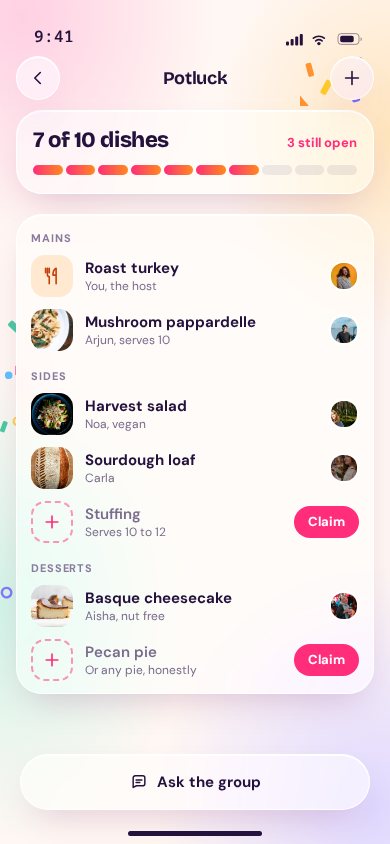
A list screen from Confetti, a party invites and RSVPs app template in a Glass style. Screen 17 of 25.
Confetti is a complete party app: welcome, sign in, a home with the invite waiting on you, the invite itself with a tear-off RSVP stub, an RSVP form and a confirmation, a gift list, then the host side: a new party, a gallery of invite designs, the invite editor, adding guests, review and send, invites sent, the party page, the guest list, an RSVP tracker, a potluck, the party chat and live arrivals on a map. Plus a calendar, a shared photo wall, notifications, a Plus plan, profile and settings. Sherbet glass with hot pink, tangerine and confetti in six colours.
| Detail | Value |
|---|---|
| Screen type | List |
| App | Confetti: Party invites and RSVPs |
| Category | Social |
| Design language | Glass, light |
| Type | Bricolage Grotesque for headings, DM Sans for text |
| Colours | #fff7f3 background, #ffffff surface, #24123d text, #7a6b8c text-muted, #ff2d7a accent, #ffffff accent-contrast, #6d5cff secondary, #12b886 success, #ff9f1c warning, #ead9e6 border |
What this screen says
- Potluck
- 7 of 10 dishes3 still open
- Mains
- Roast turkeyYou, the host
- Mushroom pappardelleArjun, serves 10
- Sides
- Harvest saladNoa, vegan
- Sourdough loafCarla
- StuffingServes 10 to 12
- Claim
- Desserts
- Basque cheesecakeAisha, nut free
- Pecan pieOr any pie, honestly
- Ask the group
Around it in Confetti
More list and feed screens
- Ripple Replies: Voice notes social
- Duo Calendar: An app for two
- Soapbox Takes: Weekly debates and polls
- Ballot Voters: Settle it on paper
- Murmur Chats: Chat rooms for art lovers
- Wink Likes: Video first dating
- Snoot Places: Social app for pets
- Huddle Notifications: Interest groups and meetups
- Glade Comments: Photo and clip social network
- Onair Notifications: Live streaming
- Drift Comments: Reels and voice rooms
- Glitz Live now: Party live streaming
What makes a good list screen
- Show what people need to decide. Each row should carry just enough to choose: a title, one or two details and a status. Everything else belongs on the detail screen.
- Keep rows consistent. The same information in the same place on every row lets people scan down a column instead of reading each item.
- Group with headings. Dates, categories or status headings break long lists into chunks people can skip through.
- Make common actions quick. Swipe actions, a checkbox or a heart on the row save opening the item for small tasks.
The full list screen guide and every example
Remix Confetti free: describe your own app and it is drawn in this design. Or get its files from $10: Figma, React Native, SwiftUI, Flutter and HTML.