Templates · Live tracking screens · Lifestyle app · Collar
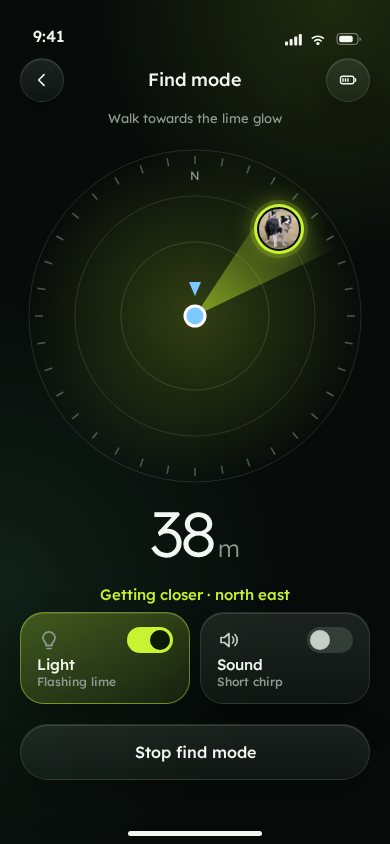
Collar Find mode screen
A tracking screen from Collar, a GPS pet tracker app template in a Glass style. Screen 7 of 25.
Collar is a complete GPS pet tracker: welcome, pairing the tracker, sign in, a live map home with the pet's ring and safe zone, Live mode on a walk with a saved walk, find mode with light and sound, an escape alert, safe zones with a fence editor and place search, a location history trail, activity and sleep dashboards with a goal, pets, a pet profile, the tracker's battery and settings, family sharing and invites, plans, checkout, alerts and settings. Deep moss night maps under smoked glass with electric lime and a coral for alerts.
| Detail | Value |
|---|---|
| Screen type | Tracking |
| App | Collar: GPS pet tracker |
| Category | Lifestyle |
| Design language | Glass, dark |
| Type | Lexend |
| Colours | #070c0a background, #121a16 surface, #f2f7f1 text, #8d9a92 text-muted, #c6f432 accent, #0d1a05 accent-contrast, #a99bff secondary, #22302a border, #ff6b4a danger |
What this screen says
- Find mode
- Walk towards the lime glow
- 38m
- Getting closer · north east
- LightFlashing lime
- SoundShort chirp
- Stop find mode
Around it in Collar
More live tracking screens
- Annex Generating: AI interior redesign
- Posy Tracking: Flower delivery and weekly stems
- Fern Light meter: Plant care
- Rewear Track order: Secondhand fashion marketplace
- Laced Track order: Sneaker drops and raffles
- Drizzle Radar: Weather with living skies
- Byline Live updates: Daily news reader
- Shelf Reading timer: Reading tracker and book club
- Handy Track pro: Home services
- Tasker On the way: Book and do local odd jobs
- Toolbox Store map: Hardware store and project lists
- Kibble Track order: Pet supplies and autoship
Every lifestyle app tracking screen
What makes a good live tracking screen
- The live number is the hero. Arrival time, pace, distance or time left, in large type at the top or centre.
- Show status in words. "Driver is 3 minutes away" or "Halfway there" alongside the map or chart.
- Make it readable while moving. Large numbers, high contrast and big buttons for pause, stop or call.
- Keep updates calm. Smooth movement on the map and steady numbers; jumpy updates feel broken.
The full live tracking screen guide and every example
Remix Collar free: describe your own app and it is drawn in this design. Or get its files from $10: Figma, React Native, SwiftUI, Flutter and HTML.