Templates · Form and input screens · Education app · Classroom
Classroom Create assignment screen
A form screen from Classroom, a class stream and assignments app template in a Minimal style. Screen 8 of 25.
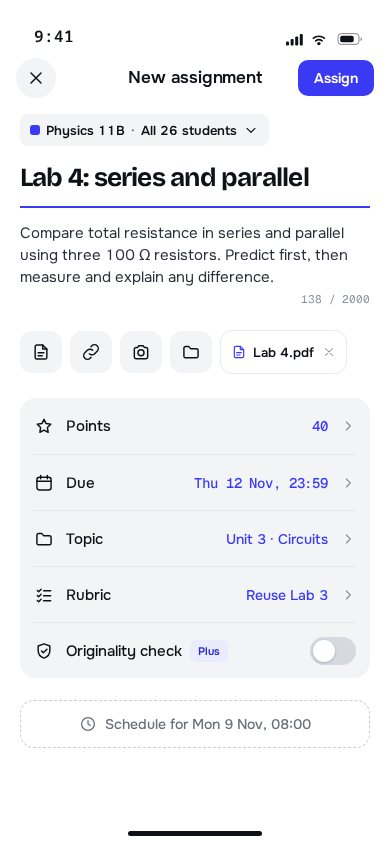
Classroom is a complete class stream and assignments app: welcome, sign in, a classes home with today's lessons and work to review, a class stream with announcements and comments, a new post, classwork by topic, an assignment with attachments and turn in counts, creating an assignment, a rubric builder, submissions, grading a lab report against the rubric, returning grades, private comments, people, a calendar of due work, a to do list, the student's own work with files, adding files, scanning notebook pages, turning in, class insights, activity, a Plus plan, profile and settings. White and soft grey with ultramarine, and tangerine, moss and teal for the other classes.
| Detail | Value |
|---|---|
| Screen type | Form |
| App | Classroom: Class stream and assignments |
| Category | Education |
| Design language | Minimal, light |
| Type | Bricolage Grotesque for headings, Onest for text |
| Colours | #ffffff background, #f3f4f6 surface, #0e1116 text, #6a707b text-muted, #3a3af4 accent, #ffffff accent-contrast, #ff6b1a secondary, #e8eaee border, #e5484d danger |
What this screen says
- New assignment
- Assign
- Physics 11B·All 26 students
- Lab 4: series and parallel
- Compare total resistance in series and parallel using three 100 Ω resistors. Predict first, then measure and explain...
- Lab 4.pdf
- Points 40
- Due Thu 12 Nov, 23:59
- Topic Unit 3 · Circuits
- Rubric Reuse Lab 3
- Originality check Plus
- Schedule for Mon 9 Nov, 08:00
Around it in Classroom
More form and input screens
- Epoch Quiz: History on a timeline
- Wren Trace: Early reading for kids
- Proof Ask Proof: Maths tutor that shows its working
- Skim Your goal: Speed reading trainer
- Terra Quiz setup: Geography and flags quiz
- Gambit Play: Chess training
- Buzzer Challenge a friend: Live trivia
- Parla Listen and type: Language learning
- Recall Add card: Flashcards and spaced repetition
- Numo Daily goal: Kids maths game
- Syntax Ask a question: Learn to code
- Tuckin Sleep timer: Bedtime stories for kids
Every education app form screen
What makes a good form screen
- Ask only what you need. Every field is a reason to stop. Remove optional fields or move them to later.
- Labels above fields. Visible labels stay readable while people type; placeholder-only labels disappear.
- Use the right keyboard and input. Number pads for amounts, email keyboards for email, pickers for dates and autofill for addresses and codes.
- Validate as people go. Show problems next to the field when people leave it, in words that say how to fix them.
The full form screen guide and every example
Remix Classroom free: describe your own app and it is drawn in this design. Or get its files from $10: Figma, React Native, SwiftUI, Flutter and HTML.