Templates · Detail screens · Finance app · Claim
Claim Report screen
A detail screen from Claim, a finance app template in a Minimal style. Screen 12 of 25.
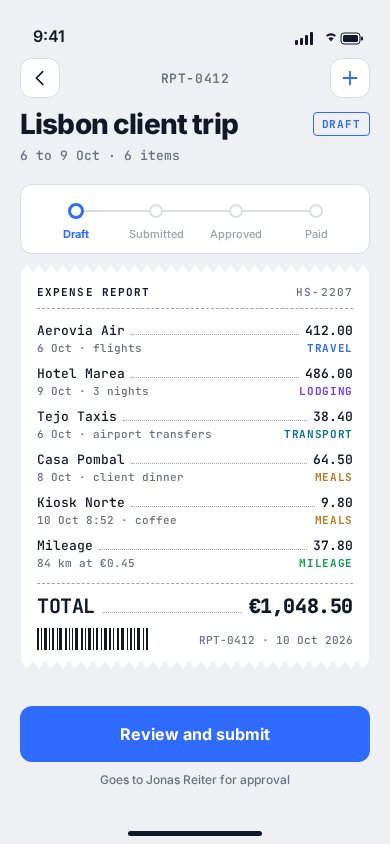
Claim is claim covers expenses end to end: scan a receipt, categorise it, log mileage and per diems, gather everything into a report, submit it and follow the reimbursement from draft to paid. It also has search, spending stats, cards, notifications, a Claim Plus plan, profile and settings.
| Detail | Value |
|---|---|
| Screen type | Detail |
| App | Claim: Expenses, filed like a till receipt |
| Category | Finance |
| Design language | Minimal, light |
| Type | Inter |
| Colours | #eef0f3 background, #ffffff surface, #111827 text, #6b7280 text-muted, #2f6bff accent, #ffffff accent-contrast, #12a150 secondary, #d9dde3 border, #d92d20 danger |
What this screen says
- RPT-0412
- Lisbon client trip
- Draft
- 6 to 9 Oct · 6 items
- Draft Submitted Approved Paid
- EXPENSE REPORTHS-2207
- Aerovia Air 412.00
- 6 Oct · flights Travel
- Hotel Marea 486.00
- 9 Oct · 3 nights Lodging
- Tejo Taxis 38.40
- 6 Oct · airport transfers Transport
- Casa Pombal 64.50
- 8 Oct · client dinner Meals
- Kiosk Norte 9.80
- 10 Oct 8:52 · coffee Meals
- Mileage 37.80
- 84 km at €0.45 Mileage
- TOTAL €1,048.50
- Review and submit
- Goes to Jonas Reiter for approval
Around it in Claim
More detail screens
- Levy Payment: Taxes for freelancers
- Bullion Gold: Gold and silver savings
- Wage Shift: Get paid as you work
- Keystone Loan: Mortgage and home loan tracker
- Rebate Card: Cashback card and rewards
- Aegis Auto policy: Insurance policies and claims
- Till Receipt: Card reader and sales for small shops
- Strike Stock: Options trading
- Prism Account: Net worth across every account
- Folio Stock: Stocks and ETF investing
- Compound Fund: Mutual funds and SIPs
- Halden Account: Premium neobank
Every finance app detail screen
What makes a good detail screen
- Lead with what identifies the item. A large image or title, the price or status, and the key facts at the top. People should know they are in the right place at a glance.
- Keep the main action visible. A sticky bottom button for Add to cart, Book or Play stays reachable while people scroll through details.
- Order information by importance. The facts that decide the choice come first; reviews, specifications and fine print further down.
- Use progressive disclosure. Long descriptions, specifications and policies can expand on tap rather than filling the screen.
The full detail screen guide and every example
Remix Claim free: describe your own app and it is drawn in this design. Or get its files from $10: Figma, React Native, SwiftUI, Flutter and HTML.