Templates · Form and input screens · Social app · Civic
Civic Report details screen
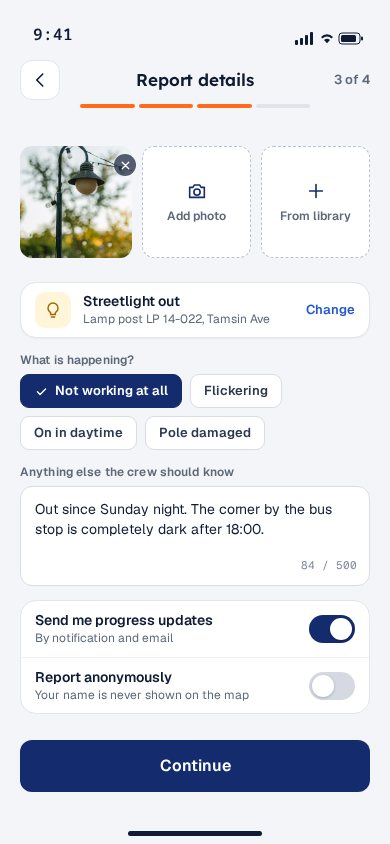
A form screen from Civic, a report issues and city services app template in an Enterprise style. Screen 6 of 25.
Civic is a complete city services app: welcome, sign in, a home with alerts, bin day and your open requests, a four step report flow (pick an issue, pin it on the map, add photos and details, review) with a sent receipt, your requests, live request tracking with the crew on the map, a nearby reports map, a neighbour's report you can follow, the bin collection calendar, parking permits and permit plans, a parking fine with payment and a receipt, city news, a road closure with its diversion, a services directory, ward stats, notifications, profile and settings. Cool grey and white with civic navy and signal orange.
| Detail | Value |
|---|---|
| Screen type | Form |
| App | Civic: Report issues and city services |
| Category | Social |
| Design language | Enterprise, light |
| Type | Lexend for headings, Geist for text |
| Colours | #f3f5f8 background, #ffffff surface, #0f1b33 text, #5d6879 text-muted, #142c6e accent, #ffffff accent-contrast, #ff6b1a secondary, #e1e5ec border, #c2352a danger |
What this screen says
- Report details
- 3 of 4
- Add photo
- From library
- Streetlight out
- Lamp post LP 14-022, Tamsin Ave
- Change
- What is happening?
- Not working at all Flickering On in daytime Pole damaged
- Anything else the crew should know
- Out since Sunday night. The corner by the bus stop is completely dark after 18:00.84 / 500
- Send me progress updates
- By notification and email
- Report anonymously
- Your name is never shown on the map
- Continue
Around it in Civic
More form and input screens
- Onair Go live: Live streaming
- Drift Start a room: Reels and voice rooms
- Glitz Go live: Party live streaming
- Hearth New circle: Messenger for trips and circles
- Chirp Your profile: Messenger with file sharing
- Banter Set up profile: Live messenger
- Natter New contact: Minimal messenger
- Nearly About you: Dating by crossed paths
- Linkup New post: Professional network and jobs
- Quorum Write answer: Questions and expert answers
- Backer New post: Support creators with memberships
- Pledge Add-ons: Back creative projects
What makes a good form screen
- Ask only what you need. Every field is a reason to stop. Remove optional fields or move them to later.
- Labels above fields. Visible labels stay readable while people type; placeholder-only labels disappear.
- Use the right keyboard and input. Number pads for amounts, email keyboards for email, pickers for dates and autofill for addresses and codes.
- Validate as people go. Show problems next to the field when people leave it, in words that say how to fix them.
The full form screen guide and every example
Remix Civic free: describe your own app and it is drawn in this design. Or get its files from $10: Figma, React Native, SwiftUI, Flutter and HTML.