Templates · Dashboard and stats screens · Productivity app · Chrono
Chrono Insights screen
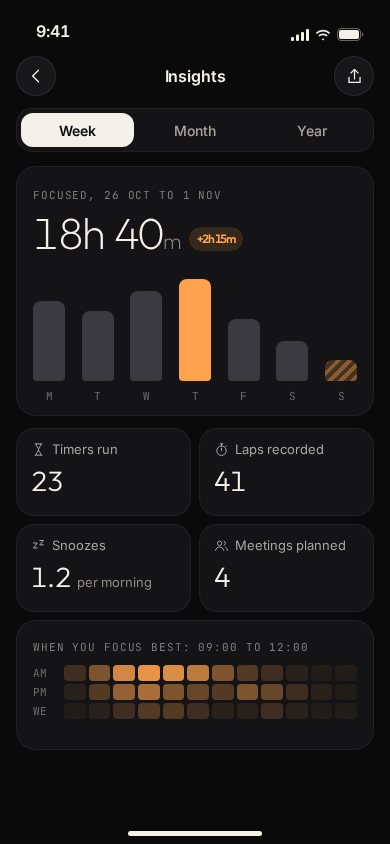
A dashboard screen from Chrono, a productivity app template in a Dark-first style. Screen 20 of 25.
Chrono is a complete clock app: welcome, picking your cities, sign in, a world clock with a live dial and a daylight band for every city, city search and a city page with its sun arc, a meeting planner across zones with an invite and confirmation, alarms with an editor and a ringing screen, bedtime, a stopwatch with laps and lap splits, timers with presets, a new timer and a running ring, focus sessions, insights, widgets, notifications, a Pro plan, profile and settings. Obsidian black with sodium amber for day and periwinkle for night.
| Detail | Value |
|---|---|
| Screen type | Dashboard |
| App | Chrono: World clock, timers and stopwatch |
| Category | Productivity |
| Design language | Dark-first, dark |
| Type | Outfit for headings, Inter for text |
| Colours | #0a0a0b background, #141416 surface, #f4f1ea text, #8f8c86 text-muted, #ffa24c accent, #1c1105 accent-contrast, #8fa2ff secondary, #242427 border, #ff6250 danger |
What this screen says
- Insights
- Week
- Month
- Year
- Focused, 26 Oct to 1 Nov
- 18h 40m+2h 15m
- M T W T F S S
- Timers run
- Laps recorded
- Snoozes
- 1.2 per morning
- Meetings planned
- When you focus best: 09:00 to 12:00
- AM PM WE
Around it in Chrono
More dashboard and stats screens
- Stow Storage: Cloud storage
- Meridian Privacy report: Mobile web browser
- Swarm Speed: Torrent client
- Bench Payments: Freelance marketplace
- Convene Summary: Video meetings
- Unplug Today: Screen time blocker
- Streak Week review: Small days, long chains
- Deskly Week: Hybrid office booking
- Pomo Stats: Focus timer
- Postbox Insights: Email for busy teams
- Daybook Insights: Calendar and planner
- Scanly Usage: Document scanner
Every productivity app dashboard screen
What makes a good dashboard screen
- One headline number. The figure that matters most, like balance, steps or revenue, large at the top with its change since the last period.
- Give numbers context. Compared with last week, against a goal or as a trend line. A number alone does not say if it is good.
- Pick simple charts. Bars for comparing periods, lines for trends and rings for progress toward a goal. Avoid charts that need a legend to read.
- Let people change the period. Day, week, month and year as a segmented control above the chart.
The full dashboard screen guide and every example
Remix Chrono free: describe your own app and it is drawn in this design. Or get its files from $10: Figma, React Native, SwiftUI, Flutter and HTML.