Templates · Dashboard and stats screens · Productivity app · Bench
Bench Payments screen
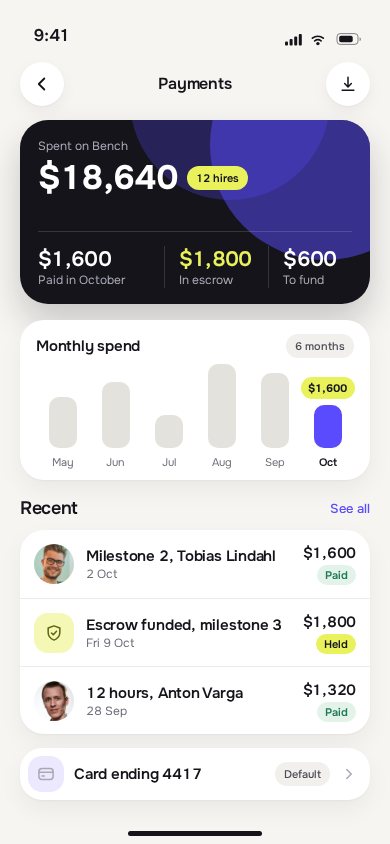
A dashboard screen from Bench, a freelance marketplace app template in an Enterprise style. Screen 22 of 25.
Bench is a complete freelance marketplace for clients: onboarding, role choice and sign in, a home with the contract that needs attention and top rated talent, categories, search with filters, a freelancer profile with portfolio, packages and reviews, posting a job with budget and timeline, proposals ranked by match score, messages and chat, sending an offer, a contract with a milestone timeline and escrow, milestone review, funding escrow, payments, leaving a review, profile and settings. Off white and white with ink, violet and lemon.
| Detail | Value |
|---|---|
| Screen type | Dashboard |
| App | Bench: Freelance marketplace |
| Category | Productivity |
| Design language | Enterprise, light |
| Type | Onest |
| Colours | #f6f5f2 background, #ffffff surface, #14141a text, #6e6e7a text-muted, #5b4bff accent, #ffffff accent-contrast, #e9f25b secondary, #e8e6e0 border, #d9453d danger |
What this screen says
- Payments
- Spent on Bench
- $18,64012 hires
- $1,600Paid in October
- $1,800In escrow
- $600To fund
- Monthly spend6 months
- May Jun Jul Aug Sep Oct
- RecentSee all
- Milestone 2, Tobias Lindahl2 Oct
- $1,600Paid
- Escrow funded, milestone 3Fri 9 Oct
- $1,800Held
- 12 hours, Anton Varga28 Sep
- $1,320Paid
- Card ending 4417Default
Around it in Bench
More dashboard and stats screens
- Aide Insights: Executive AI assistant
- Juno Usage: AI chat assistant
- Opal Dashboard: Studio dashboard
- Jot Insights: Quick notes and checklists
- Chrono Bedtime: World clock, timers and stopwatch
- Frontdesk Performance: Customer support inbox
- Campaign Report: Email marketing campaigns
- Outpost Analytics: Schedule social posts
- Pageview Acquisition: Website analytics
- Polish Score: Writing assistant and keyboard
- Tapline Tip jar: Link-in-bio pages and analytics
- Quill Analytics: Docs, wikis and databases in one workspace
Every productivity app dashboard screen
What makes a good dashboard screen
- One headline number. The figure that matters most, like balance, steps or revenue, large at the top with its change since the last period.
- Give numbers context. Compared with last week, against a goal or as a trend line. A number alone does not say if it is good.
- Pick simple charts. Bars for comparing periods, lines for trends and rings for progress toward a goal. Avoid charts that need a legend to read.
- Let people change the period. Day, week, month and year as a segmented control above the chart.
The full dashboard screen guide and every example
Remix Bench free: describe your own app and it is drawn in this design. Or get its files from $10: Figma, React Native, SwiftUI, Flutter and HTML.