Templates · Form and input screens · Productivity app · Chrono
Chrono Edit alarm screen
A form screen from Chrono, a productivity app template in a Dark-first style. Screen 11 of 25.
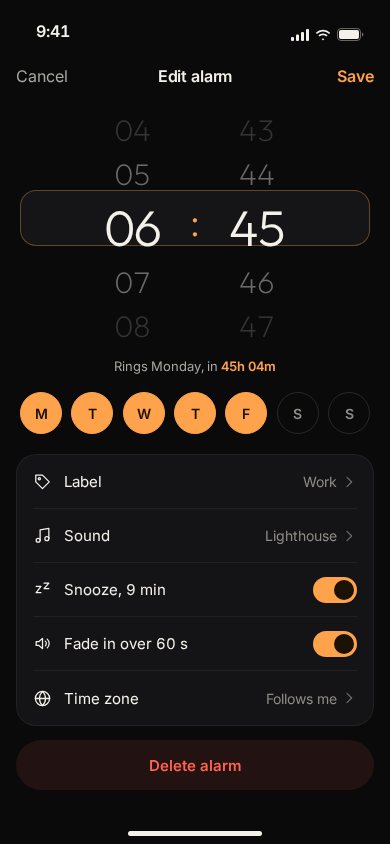
Chrono is a complete clock app: welcome, picking your cities, sign in, a world clock with a live dial and a daylight band for every city, city search and a city page with its sun arc, a meeting planner across zones with an invite and confirmation, alarms with an editor and a ringing screen, bedtime, a stopwatch with laps and lap splits, timers with presets, a new timer and a running ring, focus sessions, insights, widgets, notifications, a Pro plan, profile and settings. Obsidian black with sodium amber for day and periwinkle for night.
| Detail | Value |
|---|---|
| Screen type | Form |
| App | Chrono: World clock, timers and stopwatch |
| Category | Productivity |
| Design language | Dark-first, dark |
| Type | Outfit for headings, Inter for text |
| Colours | #0a0a0b background, #141416 surface, #f4f1ea text, #8f8c86 text-muted, #ffa24c accent, #1c1105 accent-contrast, #8fa2ff secondary, #242427 border, #ff6250 danger |
What this screen says
- Cancel
- Edit alarm
- Save
- Rings Monday, in 45h 04m
- Label Work
- Sound Lighthouse
- Snooze, 9 min
- Fade in over 60 s
- Time zone Follows me
- Delete alarm
Around it in Chrono
More form and input screens
- Glossa New document: Translate text, voice and camera
- Layout Edit text: Design anything from templates
- Tick Quick add: To-do lists and reminders
- Beacon Notify me: Find your devices and people
- Staffroom Request time off: HR, payslips and time off
- Slot New event type: Booking links and meeting scheduling
- Sheet Add field: Spreadsheets and databases
- Tunnel Double hop: VPN and online privacy
- Ping Report issue: Internet speed test
- Glance Price alert: Visual search with the camera
- Replay New recording: Record and share screen videos
- Easel Workspace: Collaborative whiteboard
Every productivity app form screen
What makes a good form screen
- Ask only what you need. Every field is a reason to stop. Remove optional fields or move them to later.
- Labels above fields. Visible labels stay readable while people type; placeholder-only labels disappear.
- Use the right keyboard and input. Number pads for amounts, email keyboards for email, pickers for dates and autofill for addresses and codes.
- Validate as people go. Show problems next to the field when people leave it, in words that say how to fix them.
The full form screen guide and every example
Remix Chrono free: describe your own app and it is drawn in this design. Or get its files from $10: Figma, React Native, SwiftUI, Flutter and HTML.