Templates · Dashboard and stats screens · Social app · Chirp
Chirp Storage screen
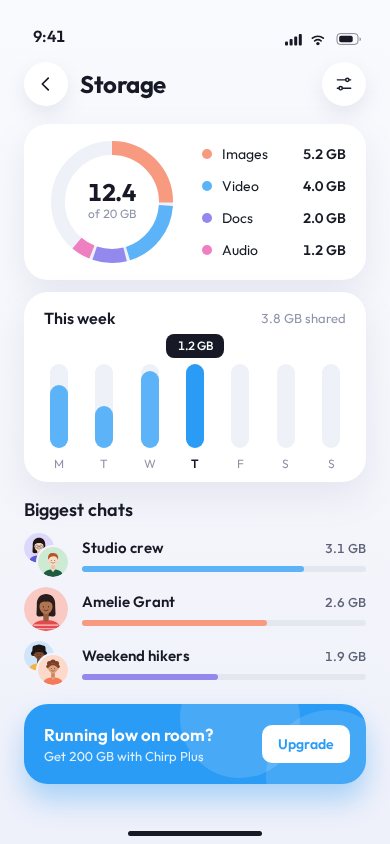
A dashboard screen from Chirp, a messenger with file sharing app template in a Playful style. Screen 20 of 25.
Chirp is a complete messenger with file sharing at its heart: onboarding, sign in and a code check, a home with recent shared files and chats, swipe actions on a chat, search across chats and files, a conversation with link, image and document previews, sharing a file, file and photo viewers, voice and video calls, groups, a files library, a storage dashboard, a plan screen, notifications, profile and settings. Soft off-white with sky blue, peach, lilac and pink pastels and drawn flat avatars.
| Detail | Value |
|---|---|
| Screen type | Dashboard |
| App | Chirp: Messenger with file sharing |
| Category | Social |
| Design language | Playful, light |
| Type | Outfit |
| Colours | #f6f7fb background, #ffffff surface, #171a26 text, #8e94a8 text-muted, #2b9cf5 accent, #ffffff accent-contrast, #ddd8fb secondary, #e9ecf3 border, #f0595c danger |
What this screen says
- Storage
- of 20 GB
- Images 5.2 GB
- Video 4.0 GB
- Docs 2.0 GB
- Audio 1.2 GB
- This week3.8 GB shared
- 1.2 GBT
- Biggest chats
- Studio crew3.1 GB
- Amelie Grant2.6 GB
- Weekend hikers1.9 GB
- Running low on room?
- Get 200 GB with Chirp Plus
- Upgrade
Around it in Chirp
More dashboard and stats screens
- Squawk Insights: Short posts and live conversation
- Agora Insights: Communities, threads and votes
- Spark Insights: Swipe dating
- Candid Memories: One real photo a day
- Blink Streaks: Camera chat and stories
- Cipher Storage: Encrypted private messenger
- Commons Group insights: Friends, groups and events
- Tether Driving: Family location and safety
- Facet Call time: Video calls with family and friends
- Stoop Block pulse: Neighbourhood noticeboard
- Aura My week: Moods with close friends
- Kindly Impact: Volunteering near you
Every social app dashboard screen
What makes a good dashboard screen
- One headline number. The figure that matters most, like balance, steps or revenue, large at the top with its change since the last period.
- Give numbers context. Compared with last week, against a goal or as a trend line. A number alone does not say if it is good.
- Pick simple charts. Bars for comparing periods, lines for trends and rings for progress toward a goal. Avoid charts that need a legend to read.
- Let people change the period. Day, week, month and year as a segmented control above the chart.
The full dashboard screen guide and every example
Remix Chirp free: describe your own app and it is drawn in this design. Or get its files from $10: Figma, React Native, SwiftUI, Flutter and HTML.