Templates · Dashboard and stats screens · Social app · Tether
Tether Driving screen
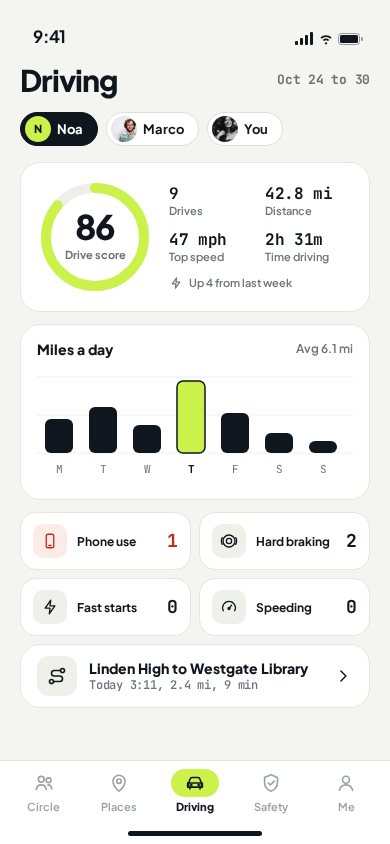
A dashboard screen from Tether, a family location and safety app template in a Minimal style. Screen 11 of 25.
Tether is a complete family location and safety app: welcome, location access, sign in and joining a circle, a live circle map with everyone's place and battery, a member page, a day of location history, places with arrival and departure alerts, adding a place, weekly driving reports and a single drive, live walk home tracking, check in, an SOS with its confirmation, crash detection, emergency contacts, alerts, circle members, invites, a Plus plan with checkout, profile and settings. Paper and white with ink, hi-vis lime and a signal red.
| Detail | Value |
|---|---|
| Screen type | Dashboard |
| App | Tether: Family location and safety |
| Category | Social |
| Design language | Minimal, light |
| Type | Plus Jakarta Sans |
| Colours | #f4f4f0 background, #ffffff surface, #10161d text, #6d727a text-muted, #cbf24a accent, #10161d accent-contrast, #4f6b00 secondary, #e6e6df border, #ef4130 danger |
What this screen says
- Driving
- Oct 24 to 30
- NNoa
- Marco
- You
- 86Drive score
- 9Drives
- 42.8 miDistance
- 47 mphTop speed
- 2h 31mTime driving
- Up 4 from last week
- Miles a dayAvg 6.1 mi
- Phone use
- Hard braking
- Fast starts
- Speeding
- Linden High to Westgate Library
- Today 3:11, 2.4 mi, 9 min
- Circle
- Places
- Safety
- Me
Around it in Tether
More dashboard and stats screens
- Pledge Dashboard: Back creative projects
- Civic My ward: Report issues and city services
- Guild Insights: Community servers with voice and text chat
- Parrot Storage: Private messaging, groups and calls
- Carrier Channel stats: Cloud messaging with channels
- Vista Insights: Photos, stories and reels
- Flick Analytics: Short video feed
- Squawk Insights: Short posts and live conversation
- Agora Insights: Communities, threads and votes
- Spark Insights: Swipe dating
- Candid Memories: One real photo a day
- Blink Streaks: Camera chat and stories
Every social app dashboard screen
What makes a good dashboard screen
- One headline number. The figure that matters most, like balance, steps or revenue, large at the top with its change since the last period.
- Give numbers context. Compared with last week, against a goal or as a trend line. A number alone does not say if it is good.
- Pick simple charts. Bars for comparing periods, lines for trends and rings for progress toward a goal. Avoid charts that need a legend to read.
- Let people change the period. Day, week, month and year as a segmented control above the chart.
The full dashboard screen guide and every example
Remix Tether free: describe your own app and it is drawn in this design. Or get its files from $10: Figma, React Native, SwiftUI, Flutter and HTML.