Templates · List and feed screens · Smart home app · Chime
Chime Routines screen
A list screen from Chime, a voice assistant and smart speaker app template in a Glass style. Screen 10 of 25.
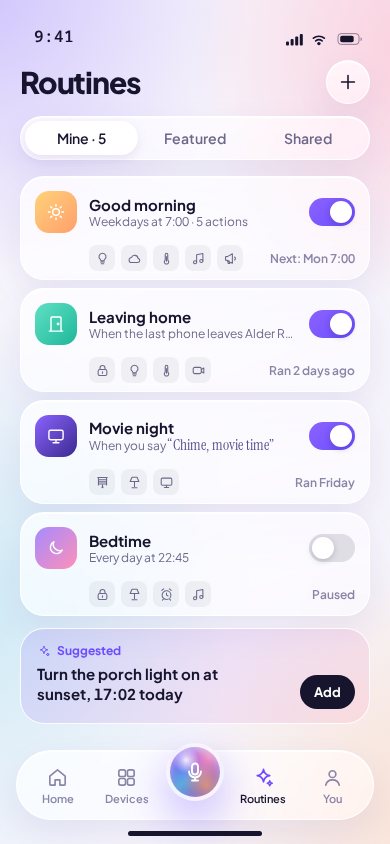
Chime is a complete voice assistant and smart speaker app: welcome, sign in and speaker setup, a home with the listening orb, now playing, a running timer and favourite devices, a live listening screen with transcript, an answer thread with a weather card and reminder, devices grouped by room, a living room with scenes and a thermostat dial, a light with a brightness capsule, routines with a builder and a success screen, timers and alarms, a shared shopping list, drop in, announcements, music on a speaker group, a skills directory, voice history with privacy controls, weekly activity, a Plus plan, notifications, a household profile and settings. Pearly lilac glass with an iridescent violet orb.
| Detail | Value |
|---|---|
| Screen type | List |
| App | Chime: Voice assistant and smart speaker |
| Category | Smart home |
| Design language | Glass, light |
| Type | Instrument Serif for headings, Plus Jakarta Sans for text |
| Colours | #f6f4fb background, #ffffff surface, #17142e text, #6d6889 text-muted, #6c4cff accent, #ffffff accent-contrast, #ff8fb8 secondary, #e6e2f2 border, #f0466e danger |
What this screen says
- Routines
- Mine · 5 Featured Shared
- Good morning
- Weekdays at 7:00 · 5 actions
- Next: Mon 7:00
- Leaving home
- When the last phone leaves Alder Row
- Ran 2 days ago
- Movie night
- When you say “Chime, movie time”
- Ran Friday
- Bedtime
- Every day at 22:45
- Paused
- Suggested
- Turn the porch light on at sunset, 17:02 today
- Add
- Home
- Devices
- You
Around it in Chime
More list and feed screens
- Latch Doors: Smart locks and guest access
- Mesh Devices: Home Wi-Fi network
- Decibel Queue: Multi-room speakers
- Nursery Lullabies: Baby monitor camera and sleep
- Porch Cameras: Home security cameras
- Sundial Roof: Solar panels and home battery
- Puddle Zones: Garden watering and sprinklers
- Upkeep Calendar: Home maintenance calendar
- Kelvin Rooms: Climate and thermostat
- Glow Rooms: Light scenes and colour
- Tagged Rooms: Home inventory for insurance
- Lobby Packages: Apartment building app
Every smart home app list screen
What makes a good list screen
- Show what people need to decide. Each row should carry just enough to choose: a title, one or two details and a status. Everything else belongs on the detail screen.
- Keep rows consistent. The same information in the same place on every row lets people scan down a column instead of reading each item.
- Group with headings. Dates, categories or status headings break long lists into chunks people can skip through.
- Make common actions quick. Swipe actions, a checkbox or a heart on the row save opening the item for small tasks.
The full list screen guide and every example
Remix Chime free: describe your own app and it is drawn in this design. Or get its files from $10: Figma, React Native, SwiftUI, Flutter and HTML.