Templates · List and feed screens · Sports app · Canter
Canter Shows screen
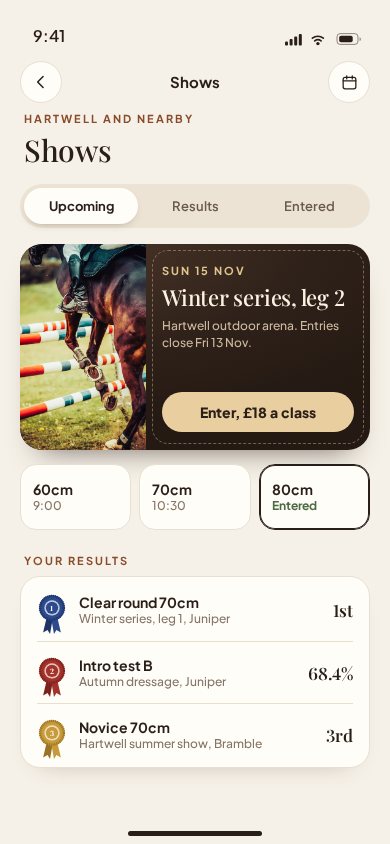
A list screen from Canter, a riding stables and lessons app template in a Luxury style. Screen 21 of 25.
Canter is a complete riding stables app: welcome, rider level and sign in, a home with the next lesson on a stitched leather card, lessons to book, instructors, the stable of horses and a horse profile, a month calendar with time slots, review, payment and a rosette confirmation, a lesson plan drawn on a dressage arena, a live ride with gait tracking, ride summaries, progress, a ride journal and log form, a trail ride, video review, shows and results, membership, notifications, profile and settings. Linen and espresso leather with cognac, brass and rosette blue.
| Detail | Value |
|---|---|
| Screen type | List |
| App | Canter: Riding stables and lessons |
| Category | Sports |
| Design language | Luxury, light |
| Type | Playfair Display for headings, Plus Jakarta Sans for text |
| Colours | #f6f1e8 background, #fffdf8 surface, #2a1e18 text, #857567 text-muted, #8a4b2a accent, #f6ead6 accent-contrast, #2c4a8c secondary, #e8dfd0 border, #a3322b danger |
What this screen says
- Shows
- Hartwell and nearby
- Upcoming Results Entered
- Sun 15 Nov
- Winter series, leg 2
- Hartwell outdoor arena. Entries close Fri 13 Nov.
- Enter, £18 a class
- 60cm9:00
- 70cm10:30
- 80cmEntered
- Your results
- Clear round 70cmWinter series, leg 1, Juniper
- 1st
- Intro test BAutumn dressage, Juniper
- Novice 70cmHartwell summer show, Bramble
- 3rd
Around it in Canter
More list and feed screens
- Fairway Notifications: Golf course guide and scorecard
- Matchday Notifications: Football scores and fantasy
- Rally Notifications: Tennis and padel club
- Swell Week ahead: Surf forecast
- Pitwall Timing: Race engineering
- Elevens Matches: Fantasy cricket leagues
- Scoreboard Play by play: Scores and news for every sport
- Bib Calendar: Find and enter races
- Wicket Commentary: Live cricket scores
- Courtside My runs: Pickup basketball games
- Tack Regattas: Sailing wind and regatta tracker
- Frag Schedule: Esports tournaments and teams
What makes a good list screen
- Show what people need to decide. Each row should carry just enough to choose: a title, one or two details and a status. Everything else belongs on the detail screen.
- Keep rows consistent. The same information in the same place on every row lets people scan down a column instead of reading each item.
- Group with headings. Dates, categories or status headings break long lists into chunks people can skip through.
- Make common actions quick. Swipe actions, a checkbox or a heart on the row save opening the item for small tasks.
The full list screen guide and every example
Remix Canter free: describe your own app and it is drawn in this design. Or get its files from $10: Figma, React Native, SwiftUI, Flutter and HTML.