Templates · List and feed screens · Finance app · Burrow
Burrow Members screen
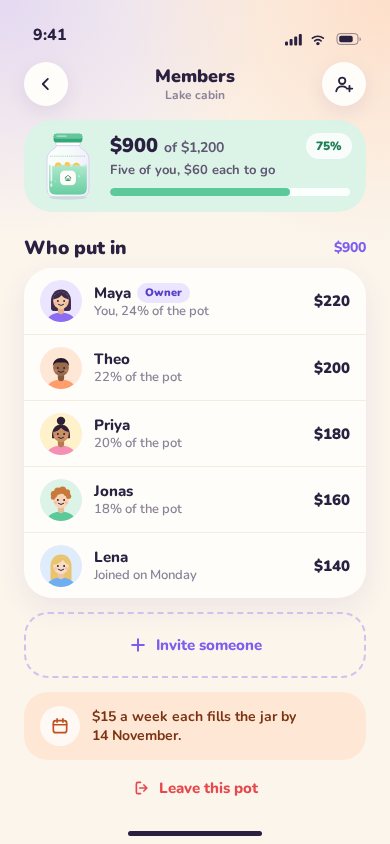
A list screen from Burrow, a shared savings pots app template in a Playful style. Screen 17 of 25.
Burrow is a complete shared savings app: welcome, sign in, a code, a home with every pot as a filling jar, the pots list, a pot with its goal, members and activity, starting a pot, setting a goal, adding money on a keypad, saving rules such as round ups, a weekly rule and a payday rule, the shared timeline, members and invites, taking money out, a goal reached celebration, insights, linked accounts, a Plus plan, profile and settings. Each pot keeps one colour everywhere, from its jar to its progress bar.
| Detail | Value |
|---|---|
| Screen type | List |
| App | Burrow: Shared savings pots |
| Category | Finance |
| Design language | Playful, light |
| Type | Nunito |
| Colours | #fbf5ec background, #fffdf9 surface, #2a2140 text, #8c8399 text-muted, #8b6cf2 accent, #ffffff accent-contrast, #ffa877 secondary, #efe6d8 border, #e5484d danger |
What this screen says
- Members
- Lake cabin
- $900 of $1,200
- Five of you, $60 each to go
- Who put in$900
- MayaOwner
- You, 24% of the pot
- Theo
- 22% of the pot
- Priya
- 20% of the pot
- Jonas
- 18% of the pot
- Lena
- Joined on Monday
- Invite someone
- $15 a week each fills the jar by 14 November.
- Leave this pot
Around it in Burrow
More list and feed screens
- Fathom Notifications: Crypto wallet
- Marigold Notifications: Mobile banking
- Zentra Activity: Crypto trading
- Payday Pay runs: Payroll for small teams
- Roundup Round ups: Invest your spare change
- Envelope Quick assign: Give every dollar a job
- Recur Subscriptions: Track and cancel subscriptions
- Keel Cards: Corporate cards and spend controls
- Giftly Wallet: Gift cards, sent and stored
- Zap Activity: Pay friends with a note
- Billfold Transactions: Cards, passes and tickets wallet
- Payly Plans: UPI payments, recharges and bills
What makes a good list screen
- Show what people need to decide. Each row should carry just enough to choose: a title, one or two details and a status. Everything else belongs on the detail screen.
- Keep rows consistent. The same information in the same place on every row lets people scan down a column instead of reading each item.
- Group with headings. Dates, categories or status headings break long lists into chunks people can skip through.
- Make common actions quick. Swipe actions, a checkbox or a heart on the row save opening the item for small tasks.
The full list screen guide and every example
Remix Burrow free: describe your own app and it is drawn in this design. Or get its files from $10: Figma, React Native, SwiftUI, Flutter and HTML.