Templates · Detail screens · Travel app · Bunk
Bunk Pick a bunk screen
A detail screen from Bunk, a hostels and backpacker meetups app template in a Gen Z style. Screen 10 of 25.
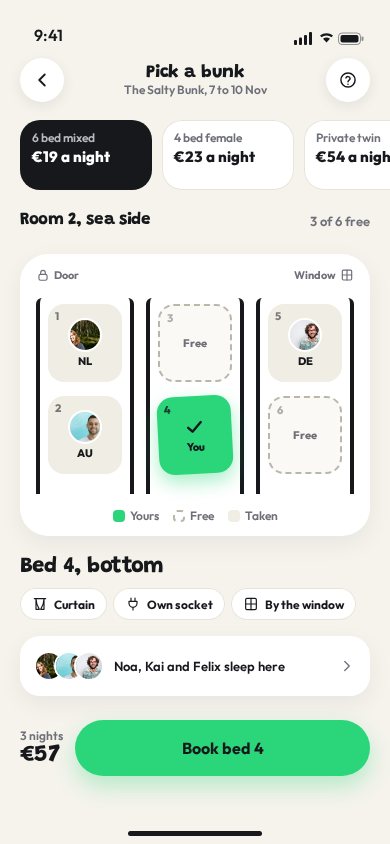
Bunk is a complete hostel and meetup app: welcome, travel vibe picker, sign in and code, a home with tonight's bed tag and meetups, search, hostel results and a price tag map, a hostel page, a pick your bunk room plan, checkout and a booking ticket, a trip route, meetups, a meetup page, hosting a meetup, a group chat with a poll, live walking map to a pub crawl, dormmates, a traveler profile, a passport of stamps and nights, notifications, Bunk Pass, profile and settings. Chalk and white with grass green, tangerine, lilac and butter stickers.
| Detail | Value |
|---|---|
| Screen type | Detail |
| App | Bunk: Hostels and backpacker meetups |
| Category | Travel |
| Design language | Gen Z, light |
| Type | Grandstander for headings, Outfit for text |
| Colours | #f5f3ec background, #ffffff surface, #17181c text, #6e6f78 text-muted, #2bd67b accent, #17181c accent-contrast, #ff7438 secondary, #e7e4da border, #ff4d5e danger |
What this screen says
- Pick a bunk
- The Salty Bunk, 7 to 10 Nov
- 6 bed mixed€19 a night
- 4 bed female€23 a night
- Private twin€54 a night
- Room 2, sea side 3 of 6 free
- Door Window
- NL
- AU
- 3 Free
- 4 You
- DE
- 6 Free
- Yours Free Taken
- Bed 4, bottom
- Curtain Own socket By the window
- Noa, Kai and Felix sleep here
- 3 nights
- Book bed 4
Around it in Bunk
More detail screens
- Hollow Stay: Cabin and boutique stays
- Aloft Flight: Flight tracker
- Pitch Campsite: Campsite booking and trip kit
- Hail Safety: Ride hailing
- Volta Station: EV charging
- Museo Exhibition: Museum guide
- Roamly Destination: Trips, stays and experiences
- Jaunt Destination: Bus, train and flight booking
- Spoke Station: Bike sharing
- Navara Yacht: Yacht charter
- Voya Trip: Travel booking
- Wheelhouse Trip request: Driver app for ride hailing
Every travel app detail screen
What makes a good detail screen
- Lead with what identifies the item. A large image or title, the price or status, and the key facts at the top. People should know they are in the right place at a glance.
- Keep the main action visible. A sticky bottom button for Add to cart, Book or Play stays reachable while people scroll through details.
- Order information by importance. The facts that decide the choice come first; reviews, specifications and fine print further down.
- Use progressive disclosure. Long descriptions, specifications and policies can expand on tap rather than filling the screen.
The full detail screen guide and every example
Remix Bunk free: describe your own app and it is drawn in this design. Or get its files from $10: Figma, React Native, SwiftUI, Flutter and HTML.