Templates · Live tracking screens · Food app · Brigade
Brigade Ticket rail screen
A tracking screen from Brigade, a restaurant kitchen and line ops app template in an Enterprise style. Screen 5 of 25.
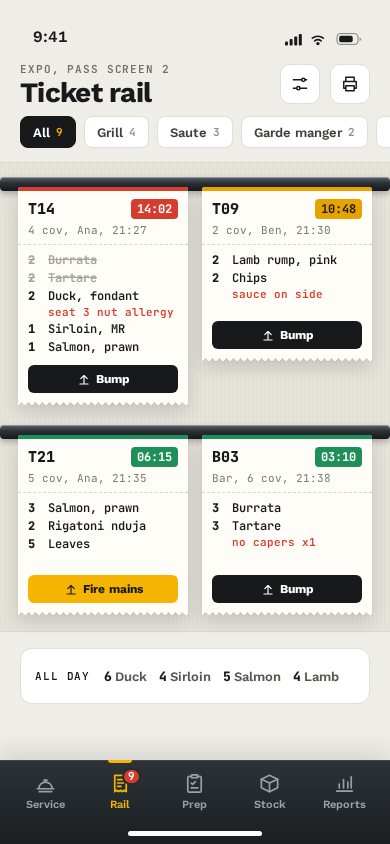
Brigade is a complete kitchen ops app for head chefs and their line: welcome, sign in and a station PIN, a live service home, the ticket rail with timers and an all day count, ticket and station details, the prep list with day dot labels, a recipe video with a portion scaler, new prep tasks, the 86 board, temperature checks and the food safety log, stock search, a supplier order with confirmation and live delivery, weekly reports, the crew on shift, notifications, a Pro plan, profile and settings. Warm stainless and white with brushed steel, saffron, and green to red timers.
| Detail | Value |
|---|---|
| Screen type | Tracking |
| App | Brigade: Restaurant kitchen and line ops |
| Category | Food |
| Design language | Enterprise, light |
| Type | JetBrains Mono for headings, Work Sans for text |
| Colours | #efede7 background, #ffffff surface, #17191b text, #6d6f6a text-muted, #f4b400 accent, #17191b accent-contrast, #22272b secondary, #e1ded5 border, #d63d2e danger |
What this screen says
- Expo, pass screen 2
- Ticket rail
- All 9 Grill 4 Saute 3 Garde manger 2 Pastry 3
- T1414:02
- 4 cov, Ana, 21:27
- 2Burrata
- 2Tartare
- 2Duck, fondant
- seat 3 nut allergy
- 1Sirloin, MR
- 1Salmon, prawn
- Bump
- T0910:48
- 2 cov, Ben, 21:30
- 2Lamb rump, pink
- 2Chips
- sauce on side
- T2106:15
- 5 cov, Ana, 21:35
- 3Salmon, prawn
- 2Rigatoni nduja
- 5Leaves
- Fire mains
- B0303:10
- Bar, 6 cov, 21:38
- 3Burrata
- 3Tartare
- no capers x1
- All day
- 6Duck 4Sirloin 5Salmon 4Lamb
Around it in Brigade
More live tracking screens
- Queue In line: Join the waitlist from anywhere
- Nosh Waitlist: Local restaurant reviews
- Buns Order code: Burger chain ordering and deals
- Slice Tracker: Pizza ordering with a live tracker
- Crate Delivery: Meal kits delivered weekly
- Dash Track order: Ten minute grocery delivery
- Aisle In store: Shared grocery lists
- Menu Order status: Scan, order and pay at the table
- Mart Aisle map: Supermarket app with loyalty and scan and go
- Rescue Pickup: Surprise bags of surplus food
- Omakase At the counter: Chef's counter reservations
- Lunchbox Packing mode: School lunch planner for parents
Every food app tracking screen
What makes a good live tracking screen
- The live number is the hero. Arrival time, pace, distance or time left, in large type at the top or centre.
- Show status in words. "Driver is 3 minutes away" or "Halfway there" alongside the map or chart.
- Make it readable while moving. Large numbers, high contrast and big buttons for pause, stop or call.
- Keep updates calm. Smooth movement on the map and steady numbers; jumpy updates feel broken.
The full live tracking screen guide and every example
Remix Brigade free: describe your own app and it is drawn in this design. Or get its files from $10: Figma, React Native, SwiftUI, Flutter and HTML.