Templates · Booking and checkout screens · Food app · Brigade
Brigade Supplier order screen
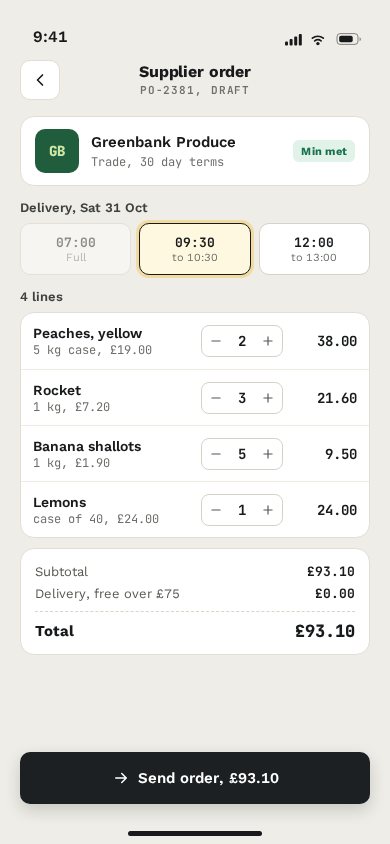
A checkout screen from Brigade, a restaurant kitchen and line ops app template in an Enterprise style. Screen 17 of 25.
Brigade is a complete kitchen ops app for head chefs and their line: welcome, sign in and a station PIN, a live service home, the ticket rail with timers and an all day count, ticket and station details, the prep list with day dot labels, a recipe video with a portion scaler, new prep tasks, the 86 board, temperature checks and the food safety log, stock search, a supplier order with confirmation and live delivery, weekly reports, the crew on shift, notifications, a Pro plan, profile and settings. Warm stainless and white with brushed steel, saffron, and green to red timers.
| Detail | Value |
|---|---|
| Screen type | Checkout |
| App | Brigade: Restaurant kitchen and line ops |
| Category | Food |
| Design language | Enterprise, light |
| Type | JetBrains Mono for headings, Work Sans for text |
| Colours | #efede7 background, #ffffff surface, #17191b text, #6d6f6a text-muted, #f4b400 accent, #17191b accent-contrast, #22272b secondary, #e1ded5 border, #d63d2e danger |
What this screen says
- Supplier orderPO-2381, draft
- GB
- Greenbank ProduceTrade, 30 day terms
- Min met
- Delivery, Sat 31 Oct
- 07:00Full
- 09:30to 10:30
- 12:00to 13:00
- 4 lines
- Peaches, yellow5 kg case, £19.00
- Rocket1 kg, £7.20
- Banana shallots1 kg, £1.90
- Lemonscase of 40, £24.00
- Subtotal£93.10
- Delivery, free over £75£0.00
- Total£93.10
- Send order, £93.10
Around it in Brigade
More booking and checkout screens
- Brewly Bag: Coffee ordering and loyalty
- Tabla Book a table: Tables worth dressing for
- Corked Cart: Wine journal and cellar
- Crumb Preorder: Neighbourhood bakery
- Tiffin Cart: Food delivery
- Courier Cash out: Food delivery driver app
- Picker Order review: Grocery shopper app
- Queue Review: Join the waitlist from anywhere
- Nosh Reserve: Local restaurant reviews
- Buns Bag: Burger chain ordering and deals
- Slice Cart: Pizza ordering with a live tracker
- Crate Your box: Meal kits delivered weekly
Every food app checkout screen
What makes a good checkout screen
- Show the total early and honestly. Taxes, delivery and service fees should appear before the last step. A higher total on the final screen feels like a trick.
- Offer wallet payments. Apple Pay and Google Pay skip card typing entirely. Show them first when they are available.
- Ask for the minimum. Only the fields needed to deliver or book. Save details for next time.
- Let people review before paying. A clear summary of items, dates, address and price, with each part editable without starting over.
The full checkout screen guide and every example
Remix Brigade free: describe your own app and it is drawn in this design. Or get its files from $10: Figma, React Native, SwiftUI, Flutter and HTML.