Templates · Settings screens · Finance app · Billfold
Billfold Card details screen
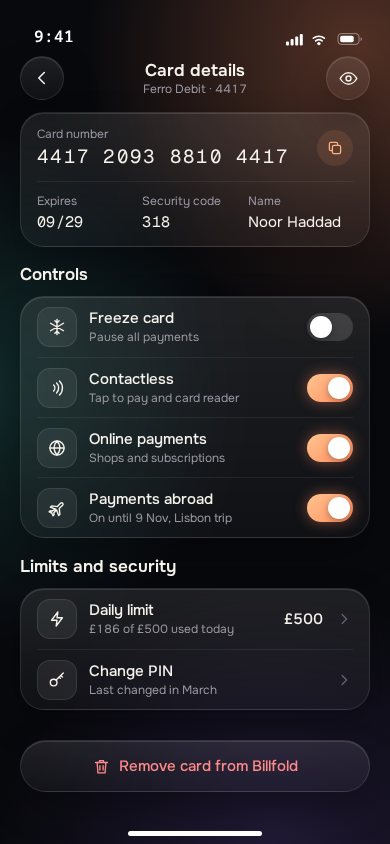
A settings screen from Billfold, a finance app template in a Glass style. Screen 7 of 25.
Billfold is a complete everyday wallet: welcome, sign in, a wallet home with stacked cards and passes, a card with its balance and latest activity, transactions and a receipt with a map, card details with freeze and limits, scanning and verifying a new card, tap to pay and a paid screen, a passes list, a boarding pass with live flight status, a concert ticket, a coffee stamp card, a transit card with top up, spending insights, search, notifications, a Plus plan, profile and settings. Near black glass with apricot and teal light.
| Detail | Value |
|---|---|
| Screen type | Settings |
| App | Billfold: Cards, passes and tickets wallet |
| Category | Finance |
| Design language | Glass, dark |
| Type | Bricolage Grotesque for headings, Onest for text |
| Colours | #08090d background, #16161d surface, #f6f2ec text, #9b98a3 text-muted, #ff9a66 accent, #2b1407 accent-contrast, #5fe3cf secondary, #2a2a33 border, #ff6b6b danger |
What this screen says
- Card detailsFerro Debit · 4417
- Card number
- Expires
- Security code
- Name
- Noor Haddad
- Controls
- Freeze card
- Pause all payments
- Contactless
- Tap to pay and card reader
- Online payments
- Shops and subscriptions
- Payments abroad
- On until 9 Nov, Lisbon trip
- Limits and security
- Daily limit
- £186 of £500 used today
- Change PIN
- Last changed in March
- Remove card from Billfold
Around it in Billfold
More settings screens
- Claim Settings: Expenses, filed like a till receipt
- Tally Settings: Monthly budgeting
- Divvy Settings: Split bills with friends
- Ticker Settings: Stock investing
- Burrow Settings: Shared savings pots
- Remit Settings: International money transfer
- Piggy Settings: Pocket money for kids
- Settle Settings: Bill payments and banking
- Fathom Security: Crypto wallet
- Marigold Card settings: Mobile banking
- Zentra Settings: Crypto trading
- Payday Settings: Payroll for small teams
Every finance app settings screen
What makes a good settings screen
- Group options into clear sections. Account, notifications, privacy, appearance and help, with headings, so people scan to the right group.
- Label settings by their effect. "Daily reminder at 8:00" is clearer than "Reminders". Add a short description under options that need one.
- Use the right control. Toggles for on and off, a row that opens a list for choices, and sliders only for ranges.
- Apply changes immediately. Most mobile settings take effect when changed, with no Save button to forget.
The full settings screen guide and every example
Remix Billfold free: describe your own app and it is drawn in this design. Or get its files from $10: Figma, React Native, SwiftUI, Flutter and HTML.