Templates · Detail screens · Travel app · Berth
Berth Dining car screen
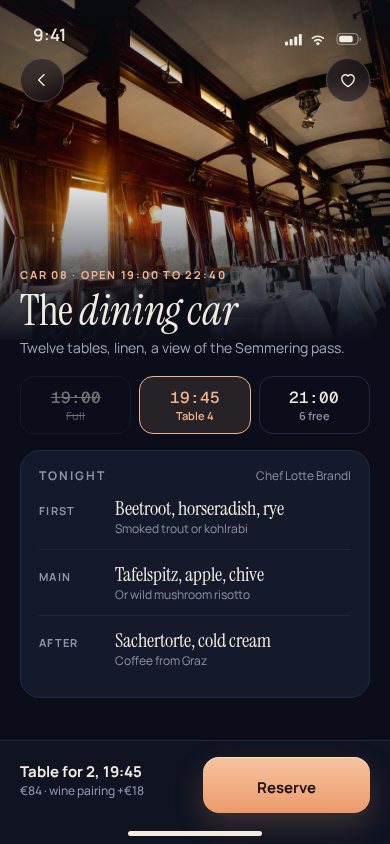
A detail screen from Berth, a night trains and sleeper cabins app template in a Luxury style. Screen 17 of 25.
Berth is a complete sleeper train app: welcome, sign in, a home with tonight's cabin, search and departures, the journey stop by stop through the night, cabin classes and a cabin, a carriage plan to choose a berth, extras, passengers, review and pay, a booked screen, trips, a boarding pass, live tracking, the dining car, cabin service with a wake-up call, explore, night stories, a night log, notifications, the Berth Circle membership, profile and settings. Midnight navy with ivory serif type, split-flap tiles and an apricot dawn.
| Detail | Value |
|---|---|
| Screen type | Detail |
| App | Berth: Night trains and sleeper cabins |
| Category | Travel |
| Design language | Luxury, dark |
| Type | Instrument Serif for headings, Manrope for text |
| Colours | #0b0e1a background, #141a2b surface, #f2ece0 text, #8e94aa text-muted, #f2b48c accent, #1a0f0a accent-contrast, #b0405a secondary, #232a40 border, #ff7a7a danger |
What this screen says
- Car 08 · Open 19:00 to 22:40
- The dining car
- Twelve tables, linen, a view of the Semmering pass.
- 19:00Full
- 19:45Table 4
- 21:006 free
- Tonight Chef Lotte Brandl
- FIRST
- Beetroot, horseradish, ryeSmoked trout or kohlrabi
- MAIN
- Tafelspitz, apple, chiveOr wild mushroom risotto
- AFTER
- Sachertorte, cold creamCoffee from Graz
- Table for 2, 19:45€84 · wine pairing +€18
- Reserve
Around it in Berth
More detail screens
- Fairground Ride: Theme park tickets, wait times and map
- Scooter: E-scooter and e-bike rental
- Nomad Country: Travel eSIM data plans
- Tern Sailing: Ferry and island hopping
- Caravan Van: Campervan rental and road trips
- Layover Flight: Airport guide, gates and lounges
- Permit Passport: Visas and travel documents wallet
- Backroad Trip: Road trip planner with stops
- Bunk Hostel: Hostels and backpacker meetups
- Piazza Tour: Self-guided city walking tours
- Fjord Port day: Cruise companion on board
- Atlas Place: Maps and navigation
Every travel app detail screen
What makes a good detail screen
- Lead with what identifies the item. A large image or title, the price or status, and the key facts at the top. People should know they are in the right place at a glance.
- Keep the main action visible. A sticky bottom button for Add to cart, Book or Play stays reachable while people scroll through details.
- Order information by importance. The facts that decide the choice come first; reviews, specifications and fine print further down.
- Use progressive disclosure. Long descriptions, specifications and policies can expand on tap rather than filling the screen.
The full detail screen guide and every example
Remix Berth free: describe your own app and it is drawn in this design. Or get its files from $10: Figma, React Native, SwiftUI, Flutter and HTML.