Templates · Dashboard and stats screens · Productivity app · Outpost
Outpost Analytics screen
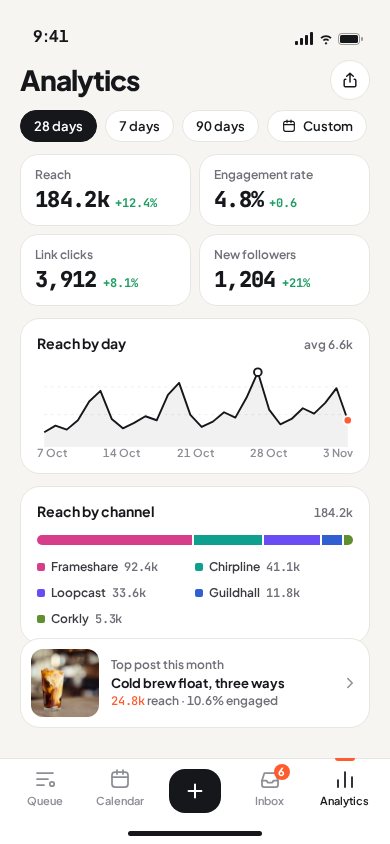
A dashboard screen from Outpost, a schedule social posts app template in a Minimal style. Screen 14 of 25.
Outpost is a complete social scheduling app for a small team: welcome, channel connecting, sign in, a queue of time slots, compose with per-channel previews, image cropping, scheduling with best times and a confirmation, a month calendar, post details, an ideas board, posting times, analytics and post stats, a channel page, an engagement inbox and replies, team approvals and review, search, notifications, a Pro plan, profile and settings. Paper white and ink with a signal orange accent and a colour per channel.
| Detail | Value |
|---|---|
| Screen type | Dashboard |
| App | Outpost: Schedule social posts |
| Category | Productivity |
| Design language | Minimal, light |
| Type | JetBrains Mono for headings, Plus Jakarta Sans for text |
| Colours | #f6f5f1 background, #ffffff surface, #16171b text, #6f7078 text-muted, #ff5b2e accent, #fff0ea accent-soft, #e8e6e0 border, #1f9d63 success, #0e9f8e channel-1, #d63e8a channel-2, #2f5fd0 channel-3, #6a4cf5 channel-4, #5f8f2e channel-5 |
What this screen says
- Analytics
- 28 days 7 days 90 days Custom
- Reach
- 184.2k+12.4%
- Engagement rate
- Link clicks
- New followers
- Reach by dayavg 6.6k
- 7 Oct 14 Oct 21 Oct 28 Oct 3 Nov
- Reach by channel184.2k
- Frameshare 92.4k Chirpline 41.1k Loopcast 33.6k Guildhall 11.8k Corkly 5.3k
- Top post this monthCold brew float, three ways24.8k reach · 10.6% engaged
- Queue
- Calendar
- 6Inbox
Around it in Outpost
More dashboard and stats screens
- Inkwell Mood trends: Daily journal
- Shortlist Salary insights: Job search and application tracker
- Parley Team pulse: Team messenger
- Docket Progress: Task and sprint planner
- Kanso Productivity: Tasks, calendar and chat
- Margin Insights: AI note taking
- Aide Insights: Executive AI assistant
- Juno Usage: AI chat assistant
- Opal Dashboard: Studio dashboard
- Jot Insights: Quick notes and checklists
- Chrono Bedtime: World clock, timers and stopwatch
- Frontdesk Performance: Customer support inbox
Every productivity app dashboard screen
What makes a good dashboard screen
- One headline number. The figure that matters most, like balance, steps or revenue, large at the top with its change since the last period.
- Give numbers context. Compared with last week, against a goal or as a trend line. A number alone does not say if it is good.
- Pick simple charts. Bars for comparing periods, lines for trends and rings for progress toward a goal. Avoid charts that need a legend to read.
- Let people change the period. Day, week, month and year as a segmented control above the chart.
The full dashboard screen guide and every example
Remix Outpost free: describe your own app and it is drawn in this design. Or get its files from $10: Figma, React Native, SwiftUI, Flutter and HTML.