Templates · Form and input screens · Productivity app · Beam
Beam Request files screen
A form screen from Beam, a send big files app template in a Playful style. Screen 19 of 25.
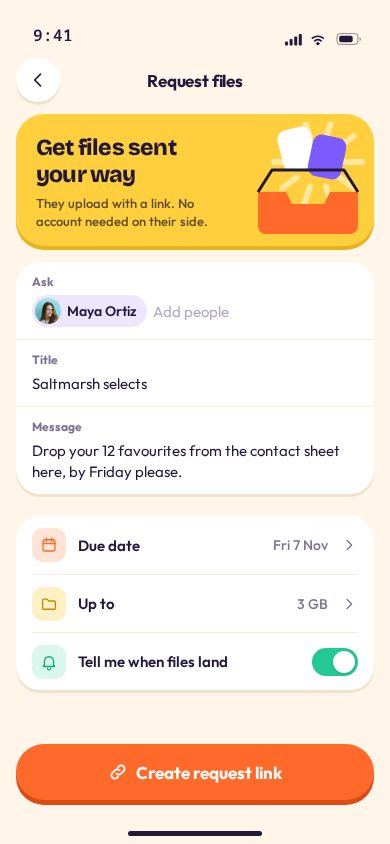
Beam is a complete big file sending app: welcome, sign in and a code, a home with a drop zone and recent transfers, picking photos and files, a new transfer by email or link with a message, expiry and password options, a live upload, sent and link ready screens, sent transfers with download counts, a transfer with who downloaded what, stats, received transfers, the receiver's download page, a photo preview, a password lock, search, file requests, notifications, a Plus plan with checkout, a branded download page, profile and settings. Warm cream with tangerine, sun yellow and grape ink.
| Detail | Value |
|---|---|
| Screen type | Form |
| App | Beam: Send big files |
| Category | Productivity |
| Design language | Playful, light |
| Type | Bricolage Grotesque for headings, Outfit for text |
| Colours | #fff6e9 background, #ffffff surface, #22183a text, #7b7191 text-muted, #ff6a2b accent, #ffffff accent-contrast, #ffcf3d secondary, #f1e2cc border, #ef4b5f danger |
What this screen says
- Request files
- Get files sent
- your way
- They upload with a link. No account needed on their side.
- Ask
- Maya Ortiz Add people
- Title
- Saltmarsh selects
- Message
- Drop your 12 favourites from the contact sheet here, by Friday please.
- Due date
- Fri 7 Nov
- Up to
- 3 GB
- Tell me when files land
- Create request link
Around it in Beam
More form and input screens
- Tick Quick add: To-do lists and reminders
- Beacon Notify me: Find your devices and people
- Staffroom Request time off: HR, payslips and time off
- Slot New event type: Booking links and meeting scheduling
- Sheet Add field: Spreadsheets and databases
- Tunnel Double hop: VPN and online privacy
- Ping Report issue: Internet speed test
- Glance Price alert: Visual search with the camera
- Replay New recording: Record and share screen videos
- Easel Workspace: Collaborative whiteboard
- Token Add account: Two-factor codes and sign-in approvals
- Parchment Text style: Documents, edit and share
Every productivity app form screen
What makes a good form screen
- Ask only what you need. Every field is a reason to stop. Remove optional fields or move them to later.
- Labels above fields. Visible labels stay readable while people type; placeholder-only labels disappear.
- Use the right keyboard and input. Number pads for amounts, email keyboards for email, pickers for dates and autofill for addresses and codes.
- Validate as people go. Show problems next to the field when people leave it, in words that say how to fix them.
The full form screen guide and every example
Remix Beam free: describe your own app and it is drawn in this design. Or get its files from $10: Figma, React Native, SwiftUI, Flutter and HTML.