Templates · Form and input screens · Productivity app · Beacon
Beacon Lost mode screen
A form screen from Beacon, a productivity app template in a Glass style. Screen 14 of 25.
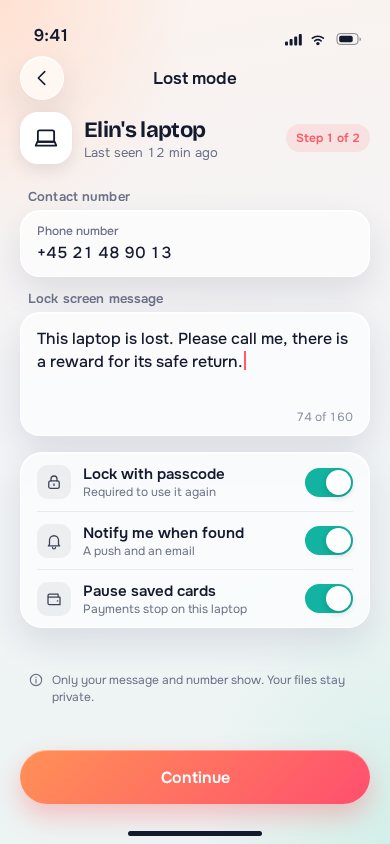
Beacon is a complete location sharing and finder app: welcome, sign in and location access, a people map with a glass sheet, a person with arrival alerts and sharing, search, a devices map, a device with play sound, directions and nearby finding, lost mode with review and confirmation, item tags with pairing, history and left behind alerts, a battery and safety overview, alerts, a Plus plan, your profile and settings. Warm map greys and frosted white glass with a coral beacon and teal.
| Detail | Value |
|---|---|
| Screen type | Form |
| App | Beacon: Find your devices and people |
| Category | Productivity |
| Design language | Glass, light |
| Type | Bricolage Grotesque for headings, Onest for text |
| Colours | #f2f3f6 background, #ffffff surface, #141a2e text, #6b7287 text-muted, #ff5a64 accent, #ffffff accent-contrast, #12b3a0 secondary, #e6e8ee border, #e5484d danger |
What this screen says
- Lost mode
- Elin's laptop
- Last seen 12 min ago
- Step 1 of 2
- Contact number
- Phone number
- Lock screen message
- This laptop is lost. Please call me, there is a reward for its safe return.
- 74 of 160
- Lock with passcodeRequired to use it again
- Notify me when foundA push and an email
- Pause saved cardsPayments stop on this laptop
- Only your message and number show. Your files stay private.
- Continue
Around it in Beacon
More form and input screens
- Postbox Compose: Email for busy teams
- Daybook New event: Calendar and planner
- Scanly Sign: Document scanner
- Keyring New item: Password manager
- Rota Swap shift: Shift scheduling for hourly teams
- Inkwell Write: Daily journal
- Shortlist Filters: Job search and application tracker
- Parley Create group: Team messenger
- Docket New task: Task and sprint planner
- Kanso New task: Tasks, calendar and chat
- Margin Edit note: AI note taking
- Aide Command: Executive AI assistant
Every productivity app form screen
What makes a good form screen
- Ask only what you need. Every field is a reason to stop. Remove optional fields or move them to later.
- Labels above fields. Visible labels stay readable while people type; placeholder-only labels disappear.
- Use the right keyboard and input. Number pads for amounts, email keyboards for email, pickers for dates and autofill for addresses and codes.
- Validate as people go. Show problems next to the field when people leave it, in words that say how to fix them.
The full form screen guide and every example
Remix Beacon free: describe your own app and it is drawn in this design. Or get its files from $10: Figma, React Native, SwiftUI, Flutter and HTML.