Templates · Form and input screens · Social app · Banter
Banter Go live screen
A form screen from Banter, a live messenger app template in a Dark-first style. Screen 14 of 25.
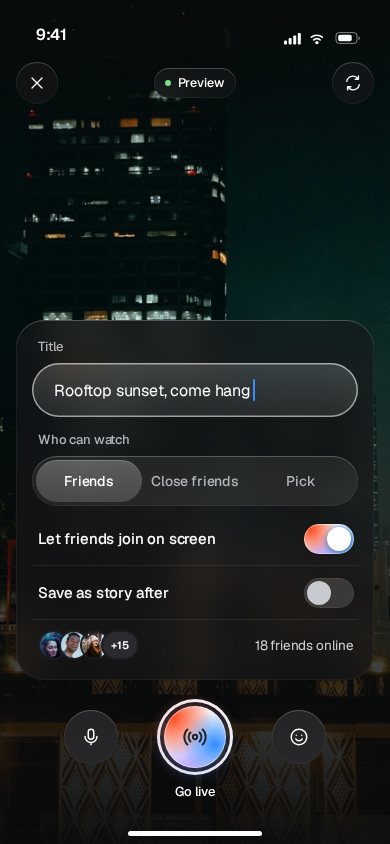
Banter is a complete live messenger: welcome, phone sign in and code, profile setup, chats with story rings and filters, search, a group chat with stacked photos and reactions, disappearing photos, a camera, stories, updates, going live to friends with a live room and a recap, voice and video calls, notifications, profile, weekly activity, a Plus plan, privacy and settings. Cold glossy black with glass controls, green for online and time, red for live and counts, and an iridescent orb as the signature.
| Detail | Value |
|---|---|
| Screen type | Form |
| App | Banter: Live messenger |
| Category | Social |
| Design language | Dark-first, dark |
| Type | Geist |
| Colours | #0a0a0b background, #1c1c1f surface, #ffffff text, #9c9ca6 text-muted, #3d8bff accent, #ffffff accent-contrast, #ff5a2e secondary, #26262a border, #ff3b30 danger |
What this screen says
- Preview
- Title
- Rooftop sunset, come hang
- Who can watch
- Friends Close friends Pick
- Let friends join on screen
- Save as story after
- 18 friends online
- Go live
Around it in Banter
More form and input screens
- Wink Interests: Video first dating
- Snoot Add your pet: Social app for pets
- Huddle New event: Interest groups and meetups
- Glade Caption: Photo and clip social network
- Onair Go live: Live streaming
- Drift Start a room: Reels and voice rooms
- Glitz Go live: Party live streaming
- Hearth New circle: Messenger for trips and circles
- Chirp Your profile: Messenger with file sharing
- Natter New contact: Minimal messenger
- Nearly About you: Dating by crossed paths
- Linkup New post: Professional network and jobs
What makes a good form screen
- Ask only what you need. Every field is a reason to stop. Remove optional fields or move them to later.
- Labels above fields. Visible labels stay readable while people type; placeholder-only labels disappear.
- Use the right keyboard and input. Number pads for amounts, email keyboards for email, pickers for dates and autofill for addresses and codes.
- Validate as people go. Show problems next to the field when people leave it, in words that say how to fix them.
The full form screen guide and every example
Remix Banter free: describe your own app and it is drawn in this design. Or get its files from $10: Figma, React Native, SwiftUI, Flutter and HTML.