Templates · React Native templates · Social · Backer
Backer React Native template: support creators with memberships app in Expo
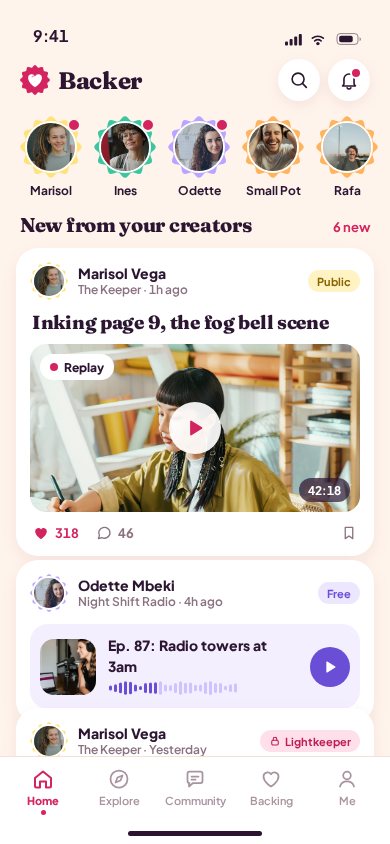
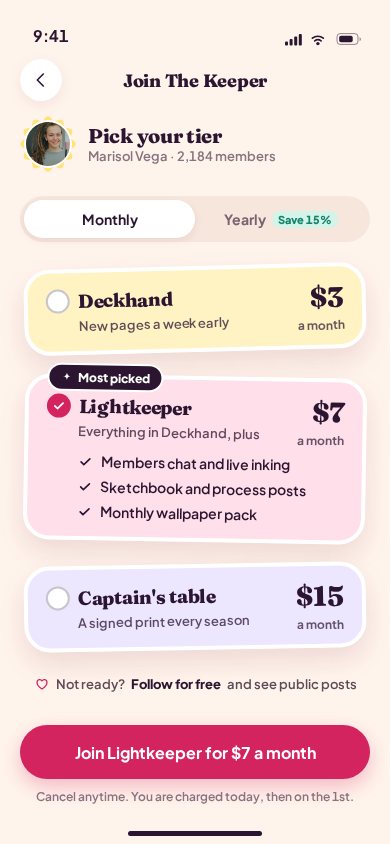
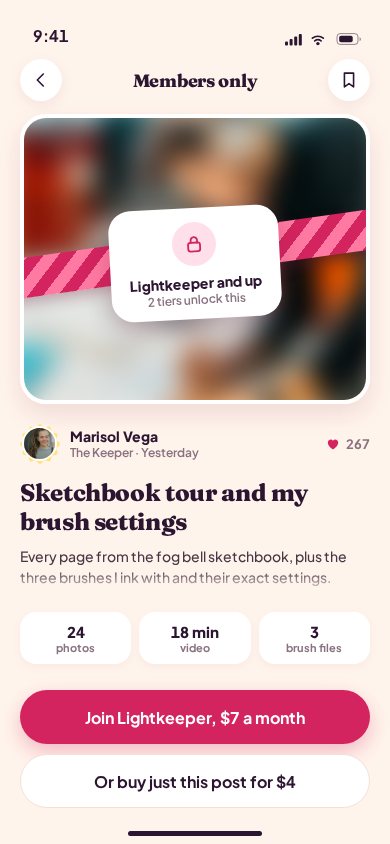
Backer is a support creators with memberships app design in a Playful style, and its React Native download is a working Expo project: all 25 screens as routes, linked the way the prototype is, with the palette in one colours file. A complete creator membership app: welcome and interests, sign up, a home feed of posts from the creators you back, explore with search, a creator page, tiers with benefits, a join checkout and a welcome confirmation, full posts, locked post previews, a video and an audio episode player, community channels and chat, your memberships, notifications, a creator studio with members, earnings and payouts, a post composer, a tier editor, creator plans, your profile and settings. Peach cream and white with jam berry, apricot, mint and lilac.
25 screens · Playful · Light · Social
The Expo project
An Expo Router project on Expo SDK 58, in TypeScript. Every file name below comes from a screen in Backer:
backer/  # The project root
  src/
    app/  # Expo Router: one file per route
      _layout.tsx  # The stack navigator, with the fonts loaded
      index.tsx  # Opens on Welcome
      welcome.tsx  # Welcome (Onboarding)
      interests.tsx  # Interests (Onboarding)
      sign-up.tsx  # Sign up (Sign in)
      home.tsx  # Home (Home)
      explore.tsx  # Explore (Search)
      creator.tsx  # Creator (Profile)
      tiers.tsx  # Tiers (Detail)
      join.tsx  # Join (Checkout)
      joined.tsx  # Joined (Success)
      post.tsx  # Post (Detail)
      locked-post.tsx  # Locked post (Detail)
      video.tsx  # Video (Media)
      episode.tsx  # Episode (Media)
      community.tsx  # Community (List)
      chat.tsx  # Chat (List)
      memberships.tsx  # Memberships (List)
      notifications.tsx  # Notifications (List)
      studio.tsx  # Studio (Dashboard)
      members.tsx  # Members (List)
      earnings.tsx  # Earnings (Dashboard)
      new-post.tsx  # New post (Form)
      edit-tier.tsx  # Edit tier (Form)
      creator-plans.tsx  # Creator plans (Paywall)
      profile.tsx  # Profile (Profile)
      settings.tsx  # Settings (Settings)
    components/
      icons.tsx  # Every icon the screens use, as a component
    theme/
      colors.ts  # The palette by role
  assets/images/  # The photos
  app.json  # App name, scheme and splash
  package.json  # Expo SDK 58, Expo Router, fonts from @expo-google-fonts
  README.md  # How to run it and what is where
How to run it
- Get the template. Buy Backer (files from $10, every format included), use a free download from a paid plan, or open it with a Template Pass.
- Download and install. Download the React Native zip, unpack it and run npm install in the folder. You need Node.js 20 or newer.
- Run it. Run npx expo start, then open it in Expo Go on your phone, or press i for the iOS simulator or a for the Android emulator.
- Make it yours. Change src/theme/colors.ts to recolour every screen at once, replace the sample content in each route, and add your data and backend.
npm install
npx expo start
What works on download
- Native components. Every screen is built from React Native views, text, images and SVG icons: no web views, no screenshots.
- Navigation. Wired between screens with Expo Router, following the links in the template's prototype: buttons and tabs go where they should.
- Theme. The palette lives in src/theme/colors.ts by role, and each screen keeps plain StyleSheet styles beside it: no styling library to set up.
What is yours to wire up
- Data. Lists, prices and profiles are static sample content from the template. Swap them for your own state or API calls.
- Backend. There is no backend, sign in or payments code. Forms and buttons are interface only, ready for your logic.
- Store setup. App icon, splash screen, bundle id and store listing are yours to set in app.json before you ship.
The 25 screens
| Screen | Screen type | Route file |
|---|---|---|
| Welcome | Onboarding | src/app/welcome.tsx |
| Interests | Onboarding | src/app/interests.tsx |
| Sign up | Sign in | src/app/sign-up.tsx |
| Home | Home | src/app/home.tsx |
| Explore | Search | src/app/explore.tsx |
| Creator | Profile | src/app/creator.tsx |
| Tiers | Detail | src/app/tiers.tsx |
| Join | Checkout | src/app/join.tsx |
| Joined | Success | src/app/joined.tsx |
| Post | Detail | src/app/post.tsx |
| Locked post | Detail | src/app/locked-post.tsx |
| Video | Media | src/app/video.tsx |
| Episode | Media | src/app/episode.tsx |
| Community | List | src/app/community.tsx |
| Chat | List | src/app/chat.tsx |
| Memberships | List | src/app/memberships.tsx |
| Notifications | List | src/app/notifications.tsx |
| Studio | Dashboard | src/app/studio.tsx |
| Members | List | src/app/members.tsx |
| Earnings | Dashboard | src/app/earnings.tsx |
| New post | Form | src/app/new-post.tsx |
| Edit tier | Form | src/app/edit-tier.tsx |
| Creator plans | Paywall | src/app/creator-plans.tsx |
| Profile | Profile | src/app/profile.tsx |
| Settings | Settings | src/app/settings.tsx |
The design
Warm and friendly: a peach cream page (#fff4ec), white cards with a soft berry tinted shadow (0 6px 18px rgba(120,30,60,.08)) and no hard borders, and one jam berry accent (#d3245f) for the main action, hearts and the active tab. Each tier has its own sweet colour: apricot (#ffb35c), mint (#3cc6a0), lilac (#b9a4ff), with butter (#ffe27a) for highlights. Headlines are Fraunces at 700 to 800 with soft rounded terminals, a word sometimes set italic in berry; body is Plus Jakarta Sans. Creator avatars sit inside a wavy 12 point scalloped seal ring in their tier colour. Tiers are drawn as die cut sticker cards with a 3px white outline, tilted 2 to 3 degrees. Locked posts are blurred and wrapped in a diagonal striped ribbon band in berry and pink with a white padlock tag naming the tier that opens them. Small sparkles and squiggles in butter and lilac decorate heroes. Headings in Fraunces, body text in Plus Jakarta Sans.
| Colour | Role |
|---|---|
| #fff4ec | background |
| #ffffff | surface |
| #2b1530 | text |
| #8a7280 | text-muted |
| #d3245f | accent |
| #ffffff | accent-contrast |
| #ffb35c | secondary |
| #f3e1d6 | border |
| #e0432f | danger |
Get the files
Remixing Backer is free. To get the template itself, the files are from $10, and one price unlocks every format:
- Figma. Every screen as editable layers: named frames, text, vectors and photos, with colour and text styles.
- React Native (Expo). An Expo Router project with every screen, the navigation between them, the theme and the icons.
- SwiftUI. An Xcode project for iOS 17 with a SwiftUI view per screen, fonts and assets.
- Flutter. A Flutter app with go_router, a widget per screen, fonts and assets.
- HTML. Each screen as a standalone HTML file with its fonts and photos, plus the design tokens as CSS and JSON.
Get the Backer files · Backer in Figma · Backer in React Native · Every template with a Template Pass ($49 for a year)
Backer in other formats
- Backer Figma template
- Backer in SwiftUI (in the same purchase)
- Backer in Flutter (in the same purchase)
- See every Backer screen and remix it free
More social React Native templates
- Ballot: Settle it on paper
- Murmur: Chat rooms for art lovers
- Wink: Video first dating
- Snoot: Social app for pets
- Huddle: Interest groups and meetups
- Glade: Photo and clip social network
- Social app templates
- All React Native templates
Questions people ask
- What do I need installed?
- Node.js 20 or newer and npm. To see it on a phone, install Expo Go; for simulators, Xcode (iOS, on a Mac) or Android Studio. No Expo account is needed to run it.
- Which Expo version is it?
- Expo SDK 58 (React Native 0.88, new architecture) with Expo Router, TypeScript throughout. Each screen is a route file in src/app, named after the screen.
- Does the same purchase include Figma and Swift?
- Yes. One price unlocks every format of Backer: Figma, React Native (Expo), SwiftUI, Flutter and HTML. A Template Pass ($49 for a year) unlocks every template.
- Can I use the Backer template commercially?
- Yes. You can build and ship commercial apps with it, for yourself or for clients, as many as you like. What you cannot do is resell or give away the template files themselves, as a template or a UI kit. The photos are free-licence stock used as placeholders: swap in your own before launch.
- Do I get updates?
- Yes, free. You buy the template, not a version: every download builds from the latest Backer design, and your library flags a template that changed since you last downloaded it.
- Is a backend included?
- No. The download is the interface: screens, navigation, styles and assets. There is no server, database, sign in, payments or API code, and the content on each screen is static sample data for you to replace.
- What is the difference between buying and remixing?
- Remixing is free: you describe your own app and it is drawn in Backer's design, in the DraftScreens studio. Buying gets you Backer itself as files, from $10, in Figma, React Native (Expo), SwiftUI, Flutter and HTML.