Templates · Detail screens · Social app · Aura
Aura Circle screen
A detail screen from Aura, a moods with close friends app template in a Gen Z style. Screen 13 of 25.
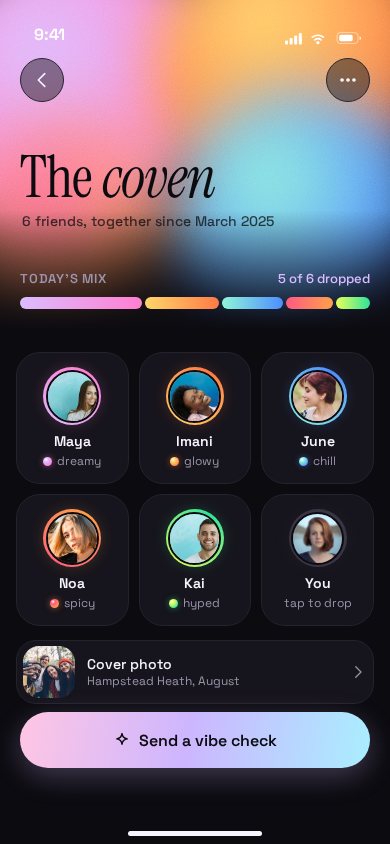
Aura is a complete close friends mood app: welcome, phone sign in and code, picking your circle of up to 12, a home where the circle's auras blend into one field, a friend's aura with note, polaroid and song, stories, a mood wheel with an intensity slider, a note with audience and map options, a dropped screen, an aura camera, circles and a circle page with today's mix, find friends, a live vibe map, chats and a chat, a weekly dashboard, a mood calendar, a shareable monthly recap, notifications with a low mood check in, an Aura+ plan with checkout, profile and settings. Near black with blurred mood orbs, an italic serif and iridescent pills.
| Detail | Value |
|---|---|
| Screen type | Detail |
| App | Aura: Moods with close friends |
| Category | Social |
| Design language | Gen Z, dark |
| Type | Instrument Serif for headings, Space Grotesk for text |
| Colours | #0c0b10 background, #16141c surface, #f7f3ff text, #9b94aa text-muted, #dcbcff accent, #0c0b10 accent-contrast, #ffd66b secondary, #25222d border, #ff7f95 danger |
What this screen says
- The coven
- 6 friends, together since March 2025
- Today's mix
- 5 of 6 dropped
- Maya
- dreamy
- Imani
- glowy
- June
- chill
- Noa
- spicy
- Kai
- hyped
- You
- tap to drop
- Cover photoHampstead Heath, August
- Send a vibe check
Around it in Aura
More detail screens
- Carrier Chat: Cloud messaging with channels
- Vista Post: Photos, stories and reels
- Flick Sound: Short video feed
- Squawk Post: Short posts and live conversation
- Agora Post: Communities, threads and votes
- Spark Profile: Swipe dating
- Candid Post: One real photo a day
- Blink Chat: Camera chat and stories
- Cipher Chat: Encrypted private messenger
- Commons Post: Friends, groups and events
- Tether Member: Family location and safety
- Facet Contact: Video calls with family and friends
Every social app detail screen
What makes a good detail screen
- Lead with what identifies the item. A large image or title, the price or status, and the key facts at the top. People should know they are in the right place at a glance.
- Keep the main action visible. A sticky bottom button for Add to cart, Book or Play stays reachable while people scroll through details.
- Order information by importance. The facts that decide the choice come first; reviews, specifications and fine print further down.
- Use progressive disclosure. Long descriptions, specifications and policies can expand on tap rather than filling the screen.
The full detail screen guide and every example
Remix Aura free: describe your own app and it is drawn in this design. Or get its files from $10: Figma, React Native, SwiftUI, Flutter and HTML.