Templates · List and feed screens · Travel app · Atlas
Atlas Offline maps screen
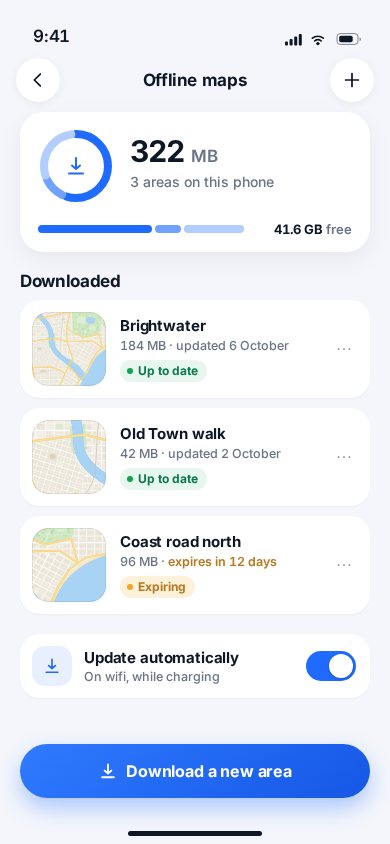
A list screen from Atlas, a maps and navigation app template in a Minimal style. Screen 22 of 25.
Atlas is a complete maps and navigation app for an invented city: onboarding, location access, a full screen map with search and category chips, results, place pages with photos and reviews, directions by car, transit, bike and foot, turn by turn navigation with lane guidance, transit steps and live departures, saved lists, recents, offline areas, live location sharing, reports, profile and settings. A warm drawn map under white sheets, with one vivid blue and a deep green turn banner.
| Detail | Value |
|---|---|
| Screen type | List |
| App | Atlas: Maps and navigation |
| Category | Travel |
| Design language | Minimal, light |
| Type | Inter |
| Colours | #f4f6fb background, #ffffff surface, #0e1726 text, #6b7486 text-muted, #1f6bff accent, #ffffff accent-contrast, #0c5a43 secondary, #e6e9f0 border, #e5484d danger |
What this screen says
- Offline maps
- 322 MB
- 3 areas on this phone
- 41.6 GB free
- Downloaded
- Brightwater184 MB · updated 6 October
- Up to date
- Old Town walk42 MB · updated 2 October
- Coast road north96 MB · expires in 12 days
- Expiring
- Update automaticallyOn wifi, while charging
- Download a new area
Around it in Atlas
More list and feed screens
- Linea Routes: City transit
- Hollow Results: Cabin and boutique stays
- Aloft My flights: Flight tracker
- Pitch Trips: Campsite booking and trip kit
- Hail Message driver: Ride hailing
- Volta Notifications: EV charging
- Museo Notifications: Museum guide
- Roamly Reviews: Trips, stays and experiences
- Jaunt Buses: Bus, train and flight booking
- Spoke Journeys: Bike sharing
- Navara Trips: Yacht charter
- Voya Results: Travel booking
What makes a good list screen
- Show what people need to decide. Each row should carry just enough to choose: a title, one or two details and a status. Everything else belongs on the detail screen.
- Keep rows consistent. The same information in the same place on every row lets people scan down a column instead of reading each item.
- Group with headings. Dates, categories or status headings break long lists into chunks people can skip through.
- Make common actions quick. Swipe actions, a checkbox or a heart on the row save opening the item for small tasks.
The full list screen guide and every example
Remix Atlas free: describe your own app and it is drawn in this design. Or get its files from $10: Figma, React Native, SwiftUI, Flutter and HTML.