Templates · Player, camera and editor screens · Music app · Aria
Aria Now playing screen
A media screen from Aria, an audiobook library app template in a Luxury style. Screen 15 of 25.
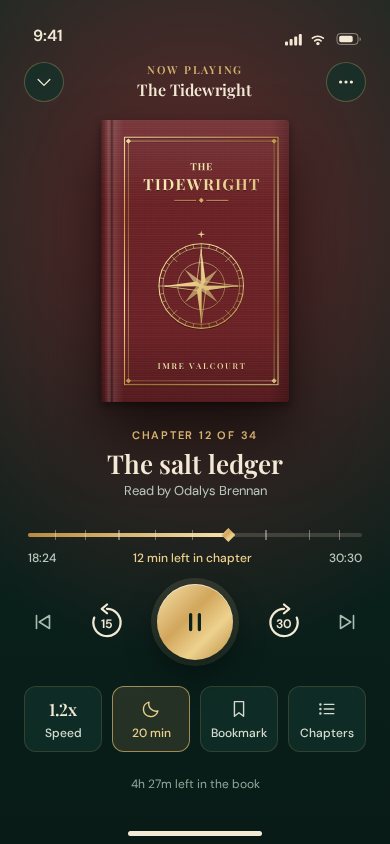
Aria is a complete audiobook app: welcome, sign in, a code and a taste picker, a home with tonight's chapter and a shelf, search, a store, a book page with reviews and its narrator, spending a credit, a library with downloads, a player with chapters, a sleep timer and bookmarks, listening stats, credits, membership, notifications, profile and settings. Every cover is a drawn cloth binding with foil lettering.
| Detail | Value |
|---|---|
| Screen type | Media |
| App | Aria: Audiobook library |
| Category | Music |
| Design language | Luxury, dark |
| Type | DM Sans |
| Colours | #0a211c background, #10302a surface, #f3ead6 text, #8fa699 text-muted, #d6b26e accent, #0a211c accent-contrast, #6d2226 secondary, #2a463c border, #e0705a danger |
What this screen says
- Now playing The Tidewright
- Chapter 12 of 34
- The salt ledger
- Read by Odalys Brennan
- 18:24 12 min left in chapter30:30
- 1.2xSpeed
- 20 min
- Bookmark
- Chapters
- 4h 27m left in the book
Around it in Aria
More player, camera and editor screens
- Hum Listening: Song recognition
- Riff Player: Upload and discover new tracks
- Groove Now spinning: Vinyl collection and crate digging
- Crossfade Decks: DJ mixing on the go
- Fork Tuner: Tuner and metronome
- Belt Now singing: Karaoke nights
- Dial Now playing: Internet radio from everywhere
- Chorus Warm-up: Singing lessons and pitch training
- Verse Record: Songwriting notebook
- Sonata Seat view: Concert hall season and tickets
- Wax Now playing: Music streaming
- Earshot Now playing: Podcast player
What makes a good media player screen
- Content takes the space. Artwork, video or the camera view should fill most of the screen.
- Primary controls in the thumb zone. Play and pause, the shutter or the main tool, large and low on the screen.
- Show progress and position. A scrubber with elapsed and remaining time, or the step in a lesson.
- Hide secondary controls until needed. Lyrics, queue, filters and advanced tools can live behind a tap or a swipe.
The full media player screen guide and every example
Remix Aria free: describe your own app and it is drawn in this design. Or get its files from $10: Figma, React Native, SwiftUI, Flutter and HTML.