Templates · Onboarding screens · Sports app · Angler
Angler Pick your species screen
An onboarding screen from Angler, a sports app template in a Dark-first style. Screen 3 of 25.
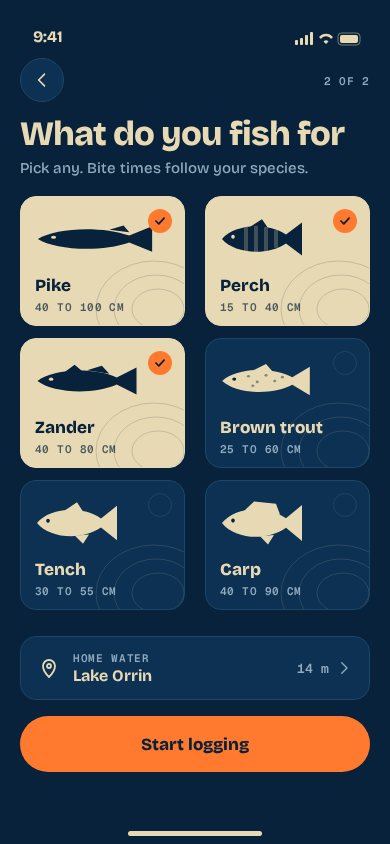
Angler is a complete fishing log: welcome, sign in and species setup, a today screen with the bite window, logging a catch with weight and length, a catch log and catch detail, a contour lake map of spots, tide and moon, bite times across 24 hours, water and weather, a tackle box, a species guide, personal bests, season stats, trips, licence and limits, notifications, a Plus plan, profile and settings. Every map, fish and chart is drawn.
| Detail | Value |
|---|---|
| Screen type | Onboarding |
| App | Angler: A fishing log drawn on the depth chart |
| Category | Sports |
| Design language | Dark-first, dark |
| Type | Bricolage Grotesque |
| Colours | #07223a background, #0d3152 surface, #e8d9b5 text, #8fa9bd text-muted, #ff7a2f accent, #07223a accent-contrast, #2f7fb0 secondary, #1d4668 border, #ff5a4d danger |
What this screen says
- 2 OF 2
- What do you fish for
- Pick any. Bite times follow your species.
- Pike40 TO 100 CM
- Perch15 TO 40 CM
- Zander40 TO 80 CM
- Brown trout25 TO 60 CM
- Tench30 TO 55 CM
- Carp40 TO 90 CM
- HOME WATER Lake Orrin
- 14 m
- Start logging
Around it in Angler
More onboarding screens
- Tack Welcome: Sailing wind and regatta tracker
- Frag Welcome: Esports tournaments and teams
- Canter Welcome: Riding stables and lessons
- Ollie Welcome: Skate spots and clips
- Eddy Welcome: River levels for paddlers
- Whistle Welcome: Grassroots league manager for coaches
- Oche Welcome: Darts scorer and leagues
- Cairn Welcome: Trails, contours and summits on one map sheet
- Lapse Welcome: Swim training
- Piste Welcome: Ski resort companion
- Crag Welcome: Climbing gym logbook
- Fairway Welcome: Golf course guide and scorecard
Every sports app onboarding screen
What makes a good onboarding screen
- One idea per screen. Each screen should say one thing in a headline people can read in a second. If a screen needs a paragraph, it is doing too much.
- Personalise with a purpose. Ask a question only if the answer changes what people see next, like a goal, a level or an interest. Then show that the answer mattered.
- Explain permissions before asking. Show your own screen saying why you need notifications, location or the camera before the system prompt. People who understand the reason are more likely to allow it.
- Let people skip. A visible skip or "I'll do this later" respects returning users and the impatient. Make sure skipping still lands them somewhere useful.
The full onboarding screen guide and every example
Remix Angler free: describe your own app and it is drawn in this design. Or get its files from $10: Figma, React Native, SwiftUI, Flutter and HTML.