Templates · Form and input screens · Productivity app · Aim
Aim Add key result screen
A form screen from Aim, a goals and key results app template in a Minimal style. Screen 11 of 25.
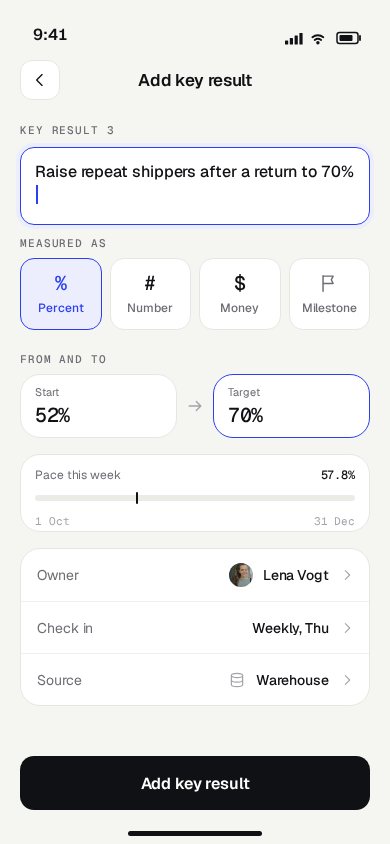
Aim is a complete objectives and key results app: welcome, setup and sign in, a today view with the quarter ruler, objectives and key result pages, a weekly check-in with confidence and a saved screen, new objectives and key results, an alignment tree, insights, team and teammate pages, search, a focus timer, a quarter close with grades, an updates feed, an audio weekly brief, plans, notifications, profile and settings. Paper white and ink with a single cobalt accent and quiet green, amber and red for status.
| Detail | Value |
|---|---|
| Screen type | Form |
| App | Aim: Goals and key results |
| Category | Productivity |
| Design language | Minimal, light |
| Type | Geist Mono for headings, Geist for text |
| Colours | #f5f5f2 background, #ffffff surface, #101114 text, #6c6d73 text-muted, #2b3ff0 accent, #ffffff accent-contrast, #eceefe secondary, #e7e7e2 border, #149e5c success, #d98a00 warning, #e0473f danger |
What this screen says
- Add key result
- Key result 3
- Raise repeat shippers after a return to 70%
- Measured as
- %Percent
- #Number
- $Money
- Milestone
- From and to
- Start 52%
- Target 70%
- Pace this week 57.8%
- 1 Oct 31 Dec
- Owner
- Lena Vogt
- Check in Weekly, Thu
- Source Warehouse
Around it in Aim
More form and input screens
- Juno New chat: AI chat assistant
- Opal New task: Studio dashboard
- Jot Format: Quick notes and checklists
- Chrono Planner: World clock, timers and stopwatch
- Frontdesk Reply: Customer support inbox
- Campaign New campaign: Email marketing campaigns
- Outpost Compose: Schedule social posts
- Pageview Compare: Website analytics
- Polish Rewrite: Writing assistant and keyboard
- Tapline Add link: Link-in-bio pages and analytics
- Quill Insert block: Docs, wikis and databases in one workspace
- Tandem Compose: Team chat, channels and huddles
Every productivity app form screen
What makes a good form screen
- Ask only what you need. Every field is a reason to stop. Remove optional fields or move them to later.
- Labels above fields. Visible labels stay readable while people type; placeholder-only labels disappear.
- Use the right keyboard and input. Number pads for amounts, email keyboards for email, pickers for dates and autofill for addresses and codes.
- Validate as people go. Show problems next to the field when people leave it, in words that say how to fix them.
The full form screen guide and every example
Remix Aim free: describe your own app and it is drawn in this design. Or get its files from $10: Figma, React Native, SwiftUI, Flutter and HTML.