Templates · Paywall screens · Lifestyle app · Admit
Admit Plus screen
A paywall screen from Admit, an events and tickets near you app template in a Playful style. Screen 19 of 25.
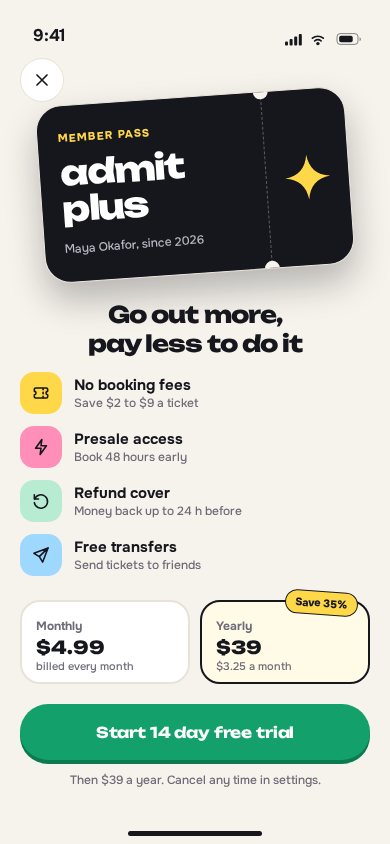
Admit is a complete local events app: welcome, interests and sign in, a discover home, search with categories, a weekend list by date, a map of what is on, event pages with the organiser, ticket tiers, checkout and a booked screen, a ticket wallet with QR codes and transfers, likes, followed organisers, notifications, a Plus plan, profile and settings, and a host mode with sales, a create event form, a guest list and a check in scanner. Oat and white with jade, sunflower and bubblegum.
| Detail | Value |
|---|---|
| Screen type | Paywall |
| App | Admit: Events and tickets near you |
| Category | Lifestyle |
| Design language | Playful, light |
| Type | Unbounded for headings, Onest for text |
| Colours | #f6f3ec background, #ffffff surface, #16161d text, #6e6b78 text-muted, #14a06a accent, #ffffff accent-contrast, #ffd84a secondary, #ff8fb8 tertiary, #e8e3d8 border, #f0533e danger |
What this screen says
- MEMBER PASSadmit
- plus
- Maya Okafor, since 2026
- Go out more,
- pay less to do it
- No booking fees
- Save $2 to $9 a ticket
- Presale access
- Book 48 hours early
- Refund cover
- Money back up to 24 h before
- Free transfers
- Send tickets to friends
- Monthly$4.99
- billed every month
- Save 35% Yearly$39
- $3.25 a month
- Start 14 day free trial
- Then $39 a year. Cancel any time in settings.
Around it in Admit
More paywall screens
- Roost Plus: Your shared house, stuck to the fridge door
- Trellis Plus: Vegetable garden planner
- Grain Pro: Camera and photo editor
- Posy weekly: Flower delivery and weekly stems
- Fern Plus: Plant care
- Doorstep Plus: Homes for sale and rent
- Rewear Plus: Secondhand fashion marketplace
- Laced Pro: Sneaker drops and raffles
- Gloss Circle: Salon and spa booking
- Vow Atelier: Wedding planner
- Drizzle Plus: Weather with living skies
- Byline Subscribe: Daily news reader
Every lifestyle app paywall screen
What makes a good paywall screen
- Lead with the outcome, not the feature list. The headline should say what changes for the person: "Train smarter every week" beats "Unlock Premium". Three to five benefits underneath are enough; more turns into a wall of ticks nobody reads.
- Show the real price, period and trial terms. State the price, how often it renews and when a free trial turns into a charge, near the button. Apple's App Store guideline 3.1.2 asks subscription apps to make this clear before purchase, and Google Play has similar rules.
- One primary button. The main call to action should be impossible to miss and say what happens: "Start 7-day free trial" or "Subscribe for $4.99/month". A second plan choice is fine; a second competing button is not.
- Make the plans easy to compare. When you offer monthly and yearly, show both prices in the same unit (per month or per week) and mark the saving on the yearly plan in plain numbers, not just a badge.
The full paywall screen guide and every example
Remix Admit free: describe your own app and it is drawn in this design. Or get its files from $10: Figma, React Native, SwiftUI, Flutter and HTML.