Templates · Player, camera and editor screens · Smart home app · Abode
Abode Speaker screen
A media screen from Abode, a smart home devices app template in a Minimal style. Screen 11 of 25.
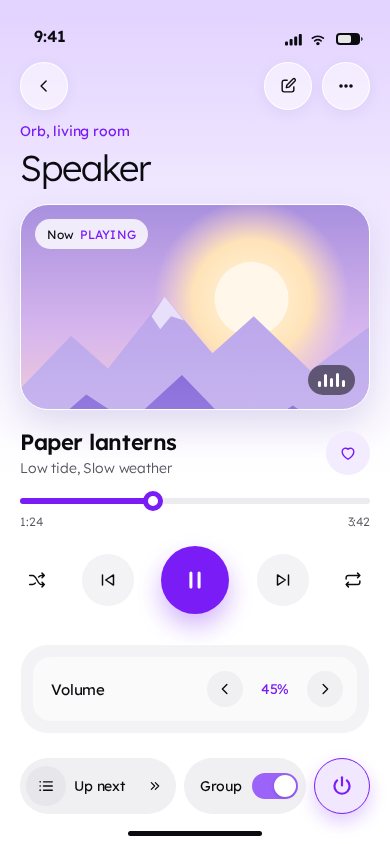
Abode is a complete smart home app centred on devices: welcome, sign in and a code, a home with the weather, what is playing, quick access and favourite scenes, every device by room, detailed controls for the air conditioner, TV, speaker, robot vacuum, lights and blinds, timers, pairing a new device, scenes you can build and run, a weekly schedule, energy use, a plan, profile and settings. White and pale grey with a lilac wash, electric violet and black.
| Detail | Value |
|---|---|
| Screen type | Media |
| App | Abode: Smart home devices |
| Category | Smart home |
| Design language | Minimal, light |
| Type | Lexend |
| Colours | #ffffff background, #f5f5f7 surface, #0c0c10 text, #74747f text-muted, #7a1cf5 accent, #ffffff accent-contrast, #ece2ff secondary, #e9e9ee border, #e5484d danger |
What this screen says
- Orb, living room
- Speaker
- NowPLAYING
- Paper lanterns
- Low tide, Slow weather
- Volume
- Up next
- Group
Around it in Abode
More player, camera and editor screens
- Tagged Scan: Home inventory for insurance
- Sweep Camera: Robot vacuum and mop
- Dusk Camera: Smart home scenarios
- Lumen Speaker: Smart home energy
- Meter Scan meter: Your energy supplier account
- Couch Channel: TV remote, casting and watchlist
- Chime Listening: Voice assistant and smart speaker
- Mesh Placement: Home Wi-Fi network
- Decibel Now playing: Multi-room speakers
- Nursery Live: Baby monitor camera and sleep
- Porch Live view: Home security cameras
- Puddle Plant check: Garden watering and sprinklers
Every smart home app media screen
What makes a good media player screen
- Content takes the space. Artwork, video or the camera view should fill most of the screen.
- Primary controls in the thumb zone. Play and pause, the shutter or the main tool, large and low on the screen.
- Show progress and position. A scrubber with elapsed and remaining time, or the step in a lesson.
- Hide secondary controls until needed. Lyrics, queue, filters and advanced tools can live behind a tap or a swipe.
The full media player screen guide and every example
Remix Abode free: describe your own app and it is drawn in this design. Or get its files from $10: Figma, React Native, SwiftUI, Flutter and HTML.