Templates · Detail screens · Education app · Zenith
Zenith Andromeda galaxy screen
A detail screen from Zenith, a night sky guide app template in a Dark-first style. Screen 11 of 25.
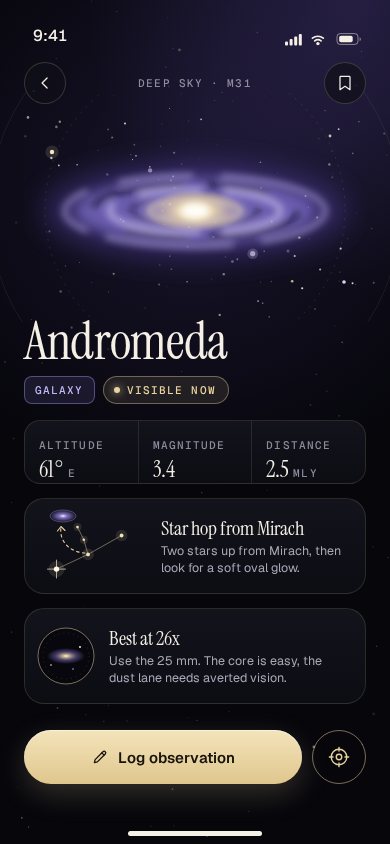
Zenith is a complete stargazing app: welcome, sign in, choosing an observing site, tonight's sky at a glance, a round sky map with a time ruler, search, planets and a planet page with an altitude curve, constellations and a constellation plate, a deep sky object, the moon, an events calendar and a meteor shower, the seeing forecast, a light pollution map, an observing log with a new entry and its confirmation, telescope tips with a step by step lesson, a Plus plan, notifications, profile and settings. Everything reads like an engraved star atlas lit in pale gold.
| Detail | Value |
|---|---|
| Screen type | Detail |
| App | Zenith: Night sky guide |
| Category | Education |
| Design language | Dark-first, dark |
| Type | Geist |
| Colours | #06060b background, #101018 surface, #f5f0e6 text, #8f8b9c text-muted, #e9d3a0 accent, #17130a accent-contrast, #9d8cf0 secondary, #2a2620 border, #f0766a danger |
What this screen says
- Deep sky · M31
- Andromeda
- Galaxy Visible now
- Altitude
- 61° E
- Magnitude
- Distance
- 2.5 Mly
- Star hop from Mirach
- Two stars up from Mirach, then look for a soft oval glow.
- Best at 26x
- Use the 25 mm. The core is easy, the dust lane needs averted vision.
- Log observation
Around it in Zenith
More detail screens
- Homeroom Timetable: School, all on one page
- Parla Unit guide: Language learning
- Recall Deck: Flashcards and spaced repetition
- Numo Daily challenge: Kids maths game
- Syntax Python basics: Learn to code
- Tuckin Story: Bedtime stories for kids
- Chalk Course: Design courses
- Encore Course: Creator courses
- Classroom Stream: Class stream and assignments
- Studyhall Course: Free lessons and practice for school
- Tutor profile: Book online tutors for any skill
- Leaf Dictionary: E-books and reading
Every education app detail screen
What makes a good detail screen
- Lead with what identifies the item. A large image or title, the price or status, and the key facts at the top. People should know they are in the right place at a glance.
- Keep the main action visible. A sticky bottom button for Add to cart, Book or Play stays reachable while people scroll through details.
- Order information by importance. The facts that decide the choice come first; reviews, specifications and fine print further down.
- Use progressive disclosure. Long descriptions, specifications and policies can expand on tap rather than filling the screen.
The full detail screen guide and every example
Remix Zenith free: describe your own app and it is drawn in this design. Or get its files from $10: Figma, React Native, SwiftUI, Flutter and HTML.