Templates · Dashboard and stats screens · Sports app · Whistle
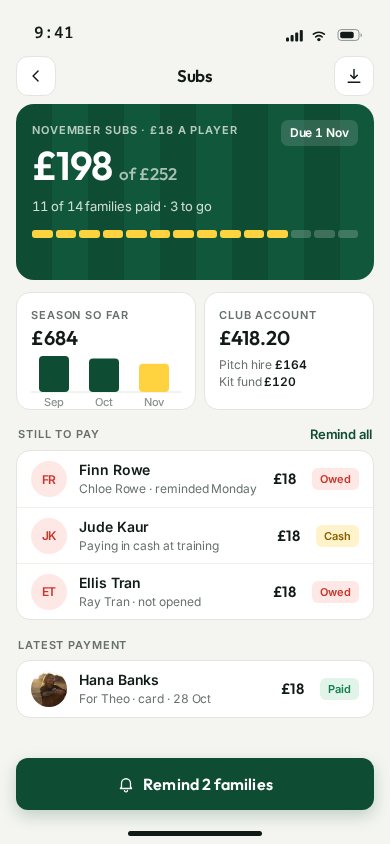
Whistle Subs screen
A dashboard screen from Whistle, a grassroots league manager for coaches app template in an Enterprise style. Screen 21 of 25.
Whistle is a complete team manager for a junior football coach: welcome, team setup and sign in, a match day home, fixtures, a match page, player availability, a drag and drop team sheet on a chalk pitch, a live match with a fair minutes tracker, goal logging and a full time report, the league table and team stats, the squad, a player, adding a player, a training plan, finding and booking a pitch, subs collection, notifications, a club plan, the coach profile and settings. Chalk white and mown turf green with kit yellow and shield crests.
| Detail | Value |
|---|---|
| Screen type | Dashboard |
| App | Whistle: Grassroots league manager for coaches |
| Category | Sports |
| Design language | Enterprise, light |
| Type | Outfit for headings, Inter for text |
| Colours | #f4f5f0 background, #ffffff surface, #111a16 text, #67716b text-muted, #0e4d34 accent, #ffffff accent-contrast, #ffd23f secondary, #e3e6de border, #c9372c danger |
What this screen says
- Subs
- November subs · £18 a player Due 1 Nov
- £198 of £252
- 11 of 14 families paid · 3 to go
- Season so far £684
- Club account £418.20
- Pitch hire £164
- Kit fund £120
- Still to pay Remind all
- FR
- Finn Rowe
- Chloe Rowe · reminded Monday
- £18Owed
- JK
- Jude Kaur
- Paying in cash at training
- £18Cash
- ET
- Ellis Tran
- Ray Tran · not opened
- Latest payment
- Hana Banks
- For Theo · card · 28 Oct
- £18Paid
- Remind 2 families
Around it in Whistle
More dashboard and stats screens
- Canter Ride summary: Riding stables and lessons
- Ollie Stats: Skate spots and clips
- Eddy Gauge: River levels for paddlers
- Oche Match report: Darts scorer and leagues
- Cairn Elevation: Trails, contours and summits on one map sheet
- Lapse Stroke rate: Swim training
- Angler Tide and moon: A fishing log drawn on the depth chart
- Piste Conditions: Ski resort companion
- Crag Grades: Climbing gym logbook
- Fairway Round summary: Golf course guide and scorecard
- Matchday Match stats: Football scores and fantasy
- Rally Stats: Tennis and padel club
Every sports app dashboard screen
What makes a good dashboard screen
- One headline number. The figure that matters most, like balance, steps or revenue, large at the top with its change since the last period.
- Give numbers context. Compared with last week, against a goal or as a trend line. A number alone does not say if it is good.
- Pick simple charts. Bars for comparing periods, lines for trends and rings for progress toward a goal. Avoid charts that need a legend to read.
- Let people change the period. Day, week, month and year as a segmented control above the chart.
The full dashboard screen guide and every example
Remix Whistle free: describe your own app and it is drawn in this design. Or get its files from $10: Figma, React Native, SwiftUI, Flutter and HTML.