Templates · List and feed screens · Travel app · Wheelhouse
Wheelhouse Documents screen
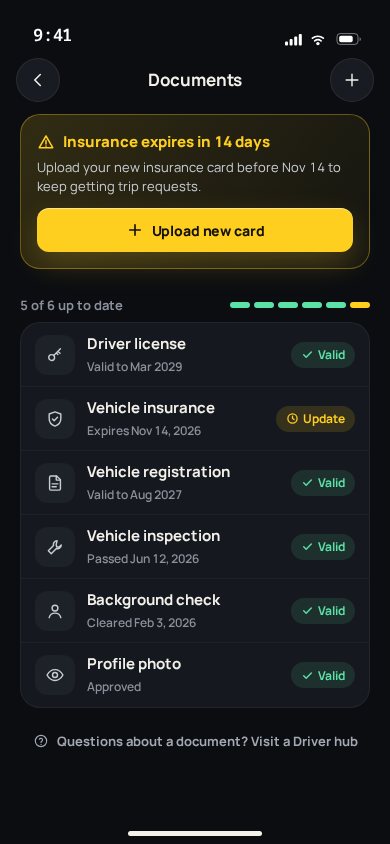
A list screen from Wheelhouse, a driver app for ride hailing app template in a Dark-first style. Screen 21 of 25.
Wheelhouse is a complete ride hailing driver app: welcome and sign in, a home map with a slide to go online, the online state with a demand heat grid, an incoming trip request with fare and countdown, turn by turn navigation to the pickup, waiting at the pickup, rider messages, the trip in progress, trip complete and rating the rider, earnings by week and by day, a trip receipt, instant cash out, the demand map, a destination filter, promotions, a Pro plan, documents, the vehicle, notifications, profile and settings. Blue black asphalt with road marking yellow and mint.
| Detail | Value |
|---|---|
| Screen type | List |
| App | Wheelhouse: Driver app for ride hailing |
| Category | Travel |
| Design language | Dark-first, dark |
| Type | Space Grotesk for headings, Manrope for text |
| Colours | #0b0d11 background, #15181e surface, #f3f1ea text, #8b919c text-muted, #ffcf1f accent, #14110a accent-contrast, #5ce1a6 secondary, #262a32 border, #ff5a5f danger |
What this screen says
- Documents
- Insurance expires in 14 days
- Upload your new insurance card before Nov 14 to keep getting trip requests.
- Upload new card
- 5 of 6 up to date
- Driver license
- Valid to Mar 2029
- Valid
- Vehicle insurance
- Expires Nov 14, 2026
- Update
- Vehicle registration
- Valid to Aug 2027
- Vehicle inspection
- Passed Jun 12, 2026
- Background check
- Cleared Feb 3, 2026
- Profile photo
- Approved
- Questions about a document? Visit a Driver hub
Around it in Wheelhouse
More list and feed screens
- Contrail Flights: Airline booking, check-in and boarding
- Keycard Results: Hotel stays, digital key and room service
- Detour Gas prices: Community driving navigation
- Convoy My rides: Carpooling between cities
- Manifest Trips: Trip plans from your confirmation emails
- Roadster Trips: Your electric car, from your phone
- Fairground Wait times: Theme park tickets, wait times and map
- Scoot Rides: E-scooter and e-bike rental
- Nomad Regions: Travel eSIM data plans
- Tern Sailings: Ferry and island hopping
- Berth Departures: Night trains and sleeper cabins
- Caravan Vans: Campervan rental and road trips
What makes a good list screen
- Show what people need to decide. Each row should carry just enough to choose: a title, one or two details and a status. Everything else belongs on the detail screen.
- Keep rows consistent. The same information in the same place on every row lets people scan down a column instead of reading each item.
- Group with headings. Dates, categories or status headings break long lists into chunks people can skip through.
- Make common actions quick. Swipe actions, a checkbox or a heart on the row save opening the item for small tasks.
The full list screen guide and every example
Remix Wheelhouse free: describe your own app and it is drawn in this design. Or get its files from $10: Figma, React Native, SwiftUI, Flutter and HTML.