Templates · Search and explore screens · Lifestyle app · Waybill
Waybill Add tracking number screen
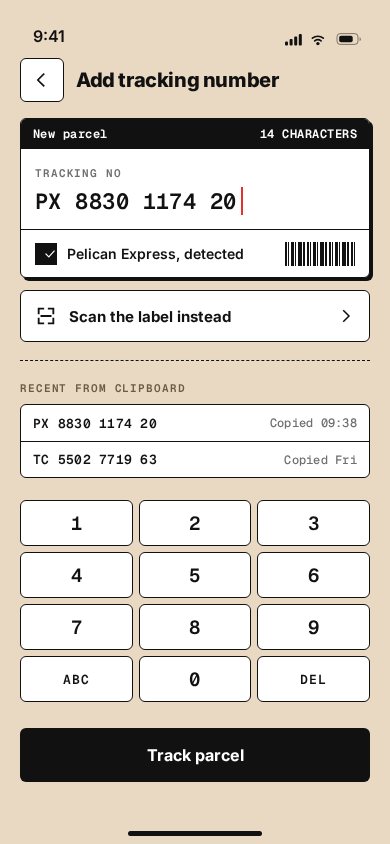
A search screen from Waybill, a lifestyle app template in a Clinical style. Screen 9 of 25.
Waybill is waybill gathers every delivery from every shop into one list with live status, a full journey timeline and a courier map. It also covers returns, customs duties, delivery preferences and sending a parcel of your own, from size and courier comparison to a printed label.
| Detail | Value |
|---|---|
| Screen type | Search |
| App | Waybill: Every parcel, read like its label |
| Category | Lifestyle |
| Design language | Clinical, light |
| Type | Inter |
| Colours | #ead9c2 background, #ffffff surface, #111111 text, #6b5a47 text-muted, #111111 accent, #ffffff accent-contrast, #c9a27a secondary, #111111 border, #e5322d danger |
What this screen says
- Add tracking number
- New parcel 14 CHARACTERS
- TRACKING NO PX 8830 1174 20
- Pelican Express, detected
- Scan the label instead
- RECENT FROM CLIPBOARD
- PX 8830 1174 20Copied 09:38
- TC 5502 7719 63Copied Fri
- ABC
- DEL
- Track parcel
Around it in Waybill
More search and explore screens
- Sable Filters: Fashion store
- Bazaar Categories: Local buy and sell
- Kiln Categories: Handmade marketplace
- Drape Occasion: AI wardrobe and daily outfits
- Mane Trends: AI hairstyle try-on
- Annex Explore: AI interior redesign
- Kino Search: Film and series streaming
- Torque Garages: The workshop manual for your own car
- Vetly Vets: Pet health record
- Stitch Patterns: A knitting companion drawn as one big knitting chart
- Roost Search: Your shared house, stuck to the fridge door
- Trellis Crops: Vegetable garden planner
Every lifestyle app search screen
What makes a good search screen
- Show something before people type. Recent searches, popular items or categories make the empty search screen useful and save typing.
- Suggest as people type. Autocomplete with matching items, not only matching words, lets people jump straight to a result.
- Make filters visible and reversible. Show active filters as chips that can be removed in one tap, and the number of results as filters change.
- Forgive typos. Close matches and "Did you mean" stop a spelling mistake from ending in an empty screen.
The full search screen guide and every example
Remix Waybill free: describe your own app and it is drawn in this design. Or get its files from $10: Figma, React Native, SwiftUI, Flutter and HTML.