Templates · List and feed screens · Lifestyle app · Vow
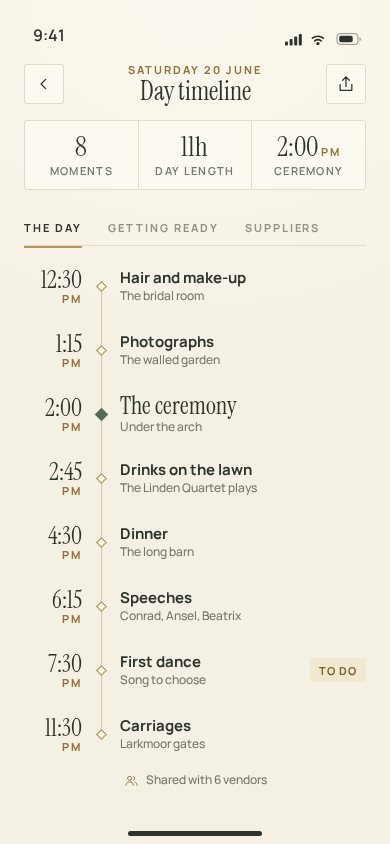
Vow Day timeline screen
A list screen from Vow, a wedding planner app template in a Luxury style. Screen 21 of 25.
Vow is a complete wedding planner: welcome, sign in, setting up the day, a home with the countdown inside a botanical wreath, a checklist by month, a budget with a category breakdown, the guest list, one guest, RSVPs with meal counts, a seating chart drawn as round tables named after plants, vendors, booking a visit, the day's timeline, the registry, a paid tier, profile and settings. Everything is typeset like fine stationery in ivory, sage and gold.
| Detail | Value |
|---|---|
| Screen type | List |
| App | Vow: Wedding planner |
| Category | Lifestyle |
| Design language | Luxury, light |
| Type | Manrope |
| Colours | #f5f0e4 background, #fcf9f1 surface, #2b332c text, #6f766a text-muted, #556b57 accent, #fcf9f1 accent-contrast, #b39558 secondary, #e3dbc8 border, #a8573f danger |
What this screen says
- Saturday 20 June
- Day timeline
- 8Moments
- 11hDay length
- 2:00 pmCeremony
- The day Getting ready Suppliers
- Hair and make-up
- The bridal room
- Photographs
- The walled garden
- The ceremony
- Under the arch
- Drinks on the lawn
- The Linden Quartet plays
- Dinner
- The long barn
- Speeches
- Conrad, Ansel, Beatrix
- First dance
- Song to choose
- To do
- Carriages
- Larkmoor gates
- Shared with 6 vendors
Around it in Vow
More list and feed screens
- Handy Choose a pro: Home services
- Tasker Choose tasker: Book and do local odd jobs
- Toolbox Questions: Hardware store and project lists
- Brief Morning brief: News in sixty words
- Kibble Reviews: Pet supplies and autoship
- Filmlog Cast and crew: Film diary and reviews
- Guardrail App limits: Parental controls and screen time
- Collar Safe zones: GPS pet tracker
- Postage Track: Send parcels and find drop-off points
- Specs Home try-on: Glasses with virtual try-on
- Circuit Deals: Electronics store with trade-in and repairs
- Provenance Results: Authenticated luxury resale
Every lifestyle app list screen
What makes a good list screen
- Show what people need to decide. Each row should carry just enough to choose: a title, one or two details and a status. Everything else belongs on the detail screen.
- Keep rows consistent. The same information in the same place on every row lets people scan down a column instead of reading each item.
- Group with headings. Dates, categories or status headings break long lists into chunks people can skip through.
- Make common actions quick. Swipe actions, a checkbox or a heart on the row save opening the item for small tasks.
The full list screen guide and every example
Remix Vow free: describe your own app and it is drawn in this design. Or get its files from $10: Figma, React Native, SwiftUI, Flutter and HTML.