Templates · Booking and checkout screens · Lifestyle app · Vetly
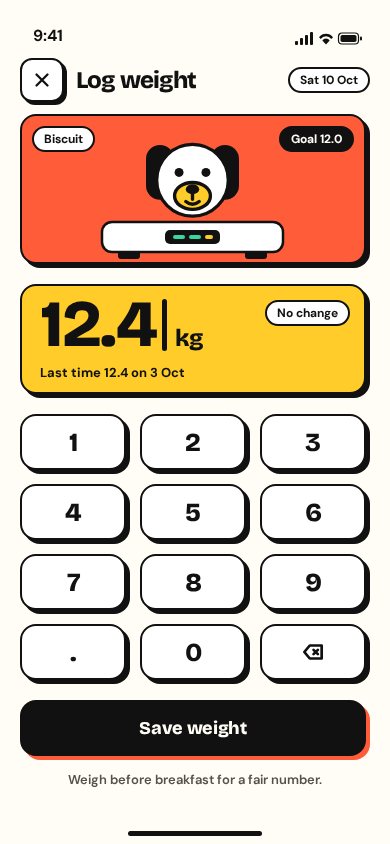
Vetly Log weight screen
A checkout screen from Vetly, a pet health record app template in a Neubrutalism style. Screen 19 of 25.
Vetly is a complete pet health app: welcome, sign in, adding a pet, a home with the next visit and today's meds, a book for each pet, a stamped vaccination card, vet visits as notched tickets with booking, medication reminders, a weight chart and log, a food log, nearby vets, a Plus plan, notifications, profile and settings. Every pet, stamp and pictogram is drawn.
| Detail | Value |
|---|---|
| Screen type | Checkout |
| App | Vetly: Pet health record |
| Category | Lifestyle |
| Design language | Neubrutalism, light |
| Type | DM Sans |
| Colours | #fffdf5 background, #ffffff surface, #111111 text, #55524b text-muted, #ff5c39 accent, #111111 accent-contrast, #2f5bff secondary, #111111 border, #d63a1a danger |
What this screen says
- Log weight
- Sat 10 Oct
- Biscuit Goal 12.0
- 12.4kg
- Last time 12.4 on 3 Oct
- No change
- Save weight
- Weigh before breakfast for a fair number.
Around it in Vetly
More booking and checkout screens
- Circuit Cart: Electronics store with trade-in and repairs
- Provenance Bag: Authenticated luxury resale
- Gavel Checkout: Live online auctions
- Tidy Pick a time: Book home cleaners
- Dorm Pay deposit: Find student housing
- Hem Pickup slot: Tailoring and alterations, collected
- Lendly Pick dates: Borrow things from neighbours
- Stub Checkout: Fan to fan ticket resale
- Trove Checkout: Visual ideas and boards
- Vidi Join channel: Video platform for creators
- Roll Prints: Photo library and backups
- Splice Export: Video editor for short clips
Every lifestyle app checkout screen
What makes a good checkout screen
- Show the total early and honestly. Taxes, delivery and service fees should appear before the last step. A higher total on the final screen feels like a trick.
- Offer wallet payments. Apple Pay and Google Pay skip card typing entirely. Show them first when they are available.
- Ask for the minimum. Only the fields needed to deliver or book. Save details for next time.
- Let people review before paying. A clear summary of items, dates, address and price, with each part editable without starting over.
The full checkout screen guide and every example
Remix Vetly free: describe your own app and it is drawn in this design. Or get its files from $10: Figma, React Native, SwiftUI, Flutter and HTML.