Templates · List and feed screens · Lifestyle app · Toolbox
Toolbox Notifications screen
A list screen from Toolbox, a hardware store and project lists app template in an Enterprise style. Screen 23 of 25.
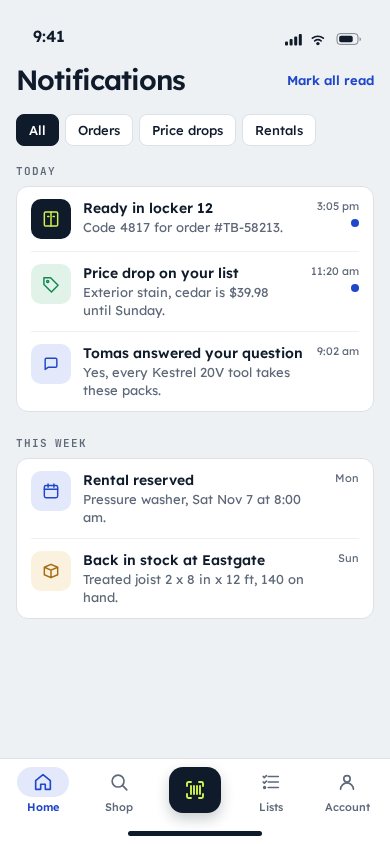
Toolbox is a complete hardware store app: welcome, choosing a home store, sign in, a home with a ready pickup, the active project and departments, search with aisle, bay and stock on every result, a product page with specs and questions, a store floor plan with a walking route, a barcode scanner, project lists sorted by aisle with a decking calculator, a cart split into pickup and delivery, checkout, order placed, orders and a pickup locker, tool rental with a reservation, a Pro plan with job spend, notifications, profile and settings. Cool grey and white with ink, cobalt and a lime signal.
| Detail | Value |
|---|---|
| Screen type | List |
| App | Toolbox: Hardware store and project lists |
| Category | Lifestyle |
| Design language | Enterprise, light |
| Type | Lexend |
| Colours | #eef1f4 background, #ffffff surface, #0f1a2a text, #5d6878 text-muted, #1f47c9 accent, #ffffff accent-contrast, #d4f34a secondary, #dce1e8 border, #cf3a3a danger |
What this screen says
- Notifications
- Mark all read
- All Orders Price drops Rentals
- Today
- Ready in locker 12
- Code 4817 for order #TB-58213.
- 3:05 pm
- Price drop on your list
- Exterior stain, cedar is $39.98 until Sunday.
- 11:20 am
- Tomas answered your question
- Yes, every Kestrel 20V tool takes these packs.
- 9:02 am
- This week
- Rental reserved
- Pressure washer, Sat Nov 7 at 8:00 am.
- Mon
- Back in stock at Eastgate
- Treated joist 2 x 8 in x 12 ft, 140 on hand.
- Sun
- Home
- Shop
- Lists
- Account
Around it in Toolbox
More list and feed screens
- Vow Notifications: Wedding planner
- Drizzle 10 day: Weather with living skies
- Byline Sections: Daily news reader
- Shelf Notifications: Reading tracker and book club
- Marquee Reviews: Cinema tickets and watchlist
- Handy Choose a pro: Home services
- Tasker Choose tasker: Book and do local odd jobs
- Brief Morning brief: News in sixty words
- Kibble Reviews: Pet supplies and autoship
- Filmlog Cast and crew: Film diary and reviews
- Guardrail App limits: Parental controls and screen time
- Collar Safe zones: GPS pet tracker
Every lifestyle app list screen
What makes a good list screen
- Show what people need to decide. Each row should carry just enough to choose: a title, one or two details and a status. Everything else belongs on the detail screen.
- Keep rows consistent. The same information in the same place on every row lets people scan down a column instead of reading each item.
- Group with headings. Dates, categories or status headings break long lists into chunks people can skip through.
- Make common actions quick. Swipe actions, a checkbox or a heart on the row save opening the item for small tasks.
The full list screen guide and every example
Remix Toolbox free: describe your own app and it is drawn in this design. Or get its files from $10: Figma, React Native, SwiftUI, Flutter and HTML.