Templates · Dashboard and stats screens · Education app · Terra
Terra Stats screen
A dashboard screen from Terra, a geography and flags quiz app template in a Glass style. Screen 19 of 25.
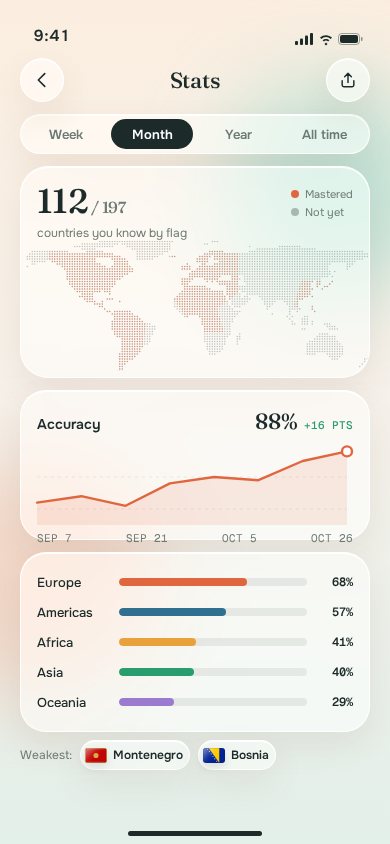
Terra is a complete geography quiz app: welcome, picking regions and a daily goal, sign in, a home with the daily challenge and streak, explore by region and topic, search, a region with mastery rings, a country fact card, quiz setup, flag, map pin and typed capital rounds with an answer reveal, round results and a mistakes review, flashcards, a live duel, a weekly league, stats with a dotted world coverage map, a passport of stamps, a Plus plan with checkout, notifications, profile and settings. Warm sand and sea glass with terracotta, ocean blue and frosted glass.
| Detail | Value |
|---|---|
| Screen type | Dashboard |
| App | Terra: Geography and flags quiz |
| Category | Education |
| Design language | Glass, light |
| Type | Fraunces for headings, Onest for text |
| Colours | #f6efe4 background, #ffffff surface, #1c2b2a text, #6e7a75 text-muted, #e0663f accent, #ffffff accent-contrast, #2f6f8f secondary, #2a9d6e success, #e6ddd0 border, #d9434f danger |
What this screen says
- Stats
- WeekMonthYearAll time
- countries you know by flag
- Mastered Not yet
- Accuracy
- 88%+16 PTS
- SEP 7 SEP 21 OCT 5 OCT 26
- Europe
- Americas
- Africa
- Asia
- Oceania
- Weakest: Montenegro Bosnia
Around it in Terra
More dashboard and stats screens
- Chalk Progress: Design courses
- Encore Progress: Creator courses
- Classroom Insights: Class stream and assignments
- Studyhall Mastery: Free lessons and practice for school
- Tutor Progress: Book online tutors for any skill
- Leaf Reading stats: E-books and reading
- Almanac Reading stats: The free encyclopedia reader
- Tiles Fiver stats: Daily word and number puzzles
- Stacks Stats: Borrow e-books and audiobooks from your library
- Penpal Progress: Language exchange chat
- Lexis Progress: A word a day
- Quanta Progress: Interactive physics lessons
Every education app dashboard screen
What makes a good dashboard screen
- One headline number. The figure that matters most, like balance, steps or revenue, large at the top with its change since the last period.
- Give numbers context. Compared with last week, against a goal or as a trend line. A number alone does not say if it is good.
- Pick simple charts. Bars for comparing periods, lines for trends and rings for progress toward a goal. Avoid charts that need a legend to read.
- Let people change the period. Day, week, month and year as a segmented control above the chart.
The full dashboard screen guide and every example
Remix Terra free: describe your own app and it is drawn in this design. Or get its files from $10: Figma, React Native, SwiftUI, Flutter and HTML.