Templates · List and feed screens · Lifestyle app · Tasker
Tasker My tasks screen
A list screen from Tasker, a lifestyle app template in a Minimal style. Screen 14 of 25.
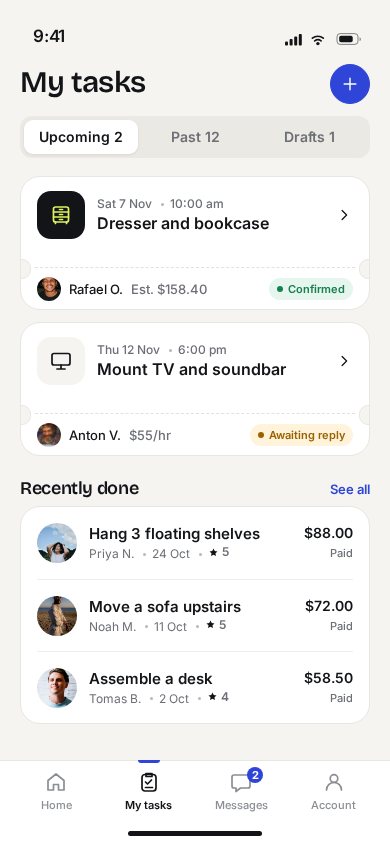
Tasker is a complete local odd jobs app: welcome, sign in, a home with the next booked task and categories, search, a furniture assembly page, describing the task with size, items and photos, choosing a tasker by rate and reviews, filters, a tasker profile, reviews, a calendar with time slots, a confirm screen and a booked ticket, messages and a chat, my tasks, a task timeline, live arrival on a map, a running task timer, pay and tip, rating, a Plus membership, notifications, account and settings. Warm paper and white with ultramarine and lime.
| Detail | Value |
|---|---|
| Screen type | List |
| App | Tasker: Book and do local odd jobs |
| Category | Lifestyle |
| Design language | Minimal, light |
| Type | Bricolage Grotesque for headings, Inter for text |
| Colours | #f5f4f0 background, #ffffff surface, #121417 text, #6c6f75 text-muted, #2f45d8 accent, #ffffff accent-contrast, #dff35f secondary, #e8e6e0 border, #d93f3f danger |
What this screen says
- My tasks
- Upcoming 2 Past 12 Drafts 1
- Sat 7 Nov 10:00 am
- Dresser and bookcase
- Rafael O.Est. $158.40 Confirmed
- Thu 12 Nov 6:00 pm
- Mount TV and soundbar
- Anton V.$55/hr Awaiting reply
- Recently done
- See all
- Hang 3 floating shelves
- Priya N. 24 Oct 5
- $88.00Paid
- Move a sofa upstairs
- Noah M. 11 Oct 5
- $72.00Paid
- Assemble a desk
- Tomas B. 2 Oct 4
- $58.50Paid
- Home
- 2Messages
- Account
Around it in Tasker
More list and feed screens
- Shelf Notifications: Reading tracker and book club
- Marquee Reviews: Cinema tickets and watchlist
- Handy Choose a pro: Home services
- Toolbox Questions: Hardware store and project lists
- Brief Morning brief: News in sixty words
- Kibble Reviews: Pet supplies and autoship
- Filmlog Cast and crew: Film diary and reviews
- Guardrail App limits: Parental controls and screen time
- Collar Safe zones: GPS pet tracker
- Postage Track: Send parcels and find drop-off points
- Specs Home try-on: Glasses with virtual try-on
- Circuit Deals: Electronics store with trade-in and repairs
Every lifestyle app list screen
What makes a good list screen
- Show what people need to decide. Each row should carry just enough to choose: a title, one or two details and a status. Everything else belongs on the detail screen.
- Keep rows consistent. The same information in the same place on every row lets people scan down a column instead of reading each item.
- Group with headings. Dates, categories or status headings break long lists into chunks people can skip through.
- Make common actions quick. Swipe actions, a checkbox or a heart on the row save opening the item for small tasks.
The full list screen guide and every example
Remix Tasker free: describe your own app and it is drawn in this design. Or get its files from $10: Figma, React Native, SwiftUI, Flutter and HTML.