Templates · Detail screens · Productivity app · Tandem
Tandem Direct message screen
A detail screen from Tandem, a productivity app template in an Enterprise style. Screen 10 of 25.
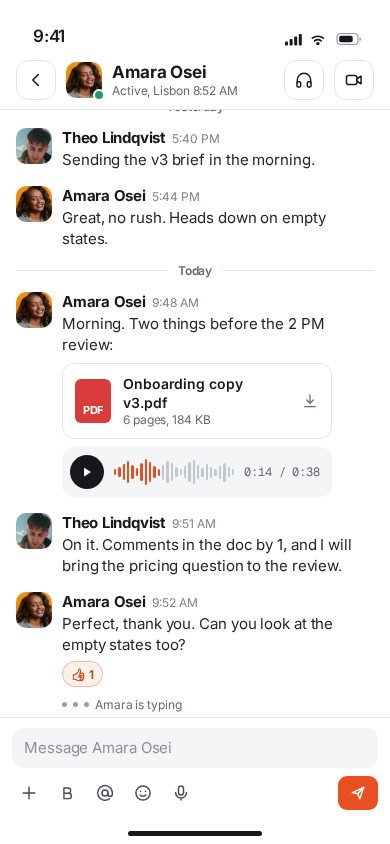
Tandem is a complete team chat app: welcome, sign in with an emailed code, a workspace picker, a home with unread channels, a live huddle and direct messages, a channel with reactions and threads, a thread, a composer with mentions and formatting, direct messages, a live huddle with a shared screen, activity, search, browsing and creating channels, channel details, files, saved for later, setting a status, workspace analytics, a Pro plan with a seat based checkout, profile and notification settings. Cool grey and white with ink and persimmon.
| Detail | Value |
|---|---|
| Screen type | Detail |
| App | Tandem: Team chat, channels and huddles |
| Category | Productivity |
| Design language | Enterprise, light |
| Type | Space Grotesk for headings, Inter for text |
| Colours | #f4f5f7 background, #ffffff surface, #16181d text, #646a76 text-muted, #ea4f22 accent, #ffffff accent-contrast, #16181d secondary, #e3e5ea border, #d93a3a danger, #1f9d6a success |
What this screen says
- Amara OseiActive, Lisbon 8:52 AM
- Yesterday
- Theo Lindqvist5:40 PM
- Sending the v3 brief in the morning.
- Amara Osei5:44 PM
- Great, no rush. Heads down on empty states.
- Today
- Amara Osei9:48 AM
- Morning. Two things before the 2 PM review:
- Onboarding copy v3.pdf6 pages, 184 KB
- Theo Lindqvist9:51 AM
- On it. Comments in the doc by 1, and I will bring the pricing question to the review.
- Amara Osei9:52 AM
- Perfect, thank you. Can you look at the empty states too?
- 👍 1
- Amara is typing
- Message Amara Osei
Around it in Tandem
More detail screens
- Tick Task: To-do lists and reminders
- Beacon Person: Find your devices and people
- Staffroom Approval: HR, payslips and time off
- Slot Meeting: Booking links and meeting scheduling
- Sheet Record: Spreadsheets and databases
- Tunnel Country: VPN and online privacy
- Ping Test details: Internet speed test
- Glance Product: Visual search with the camera
- Replay Video: Record and share screen videos
- Easel Retro template: Collaborative whiteboard
- Token Account: Two-factor codes and sign-in approvals
- Beam Transfer: Send big files
Every productivity app detail screen
What makes a good detail screen
- Lead with what identifies the item. A large image or title, the price or status, and the key facts at the top. People should know they are in the right place at a glance.
- Keep the main action visible. A sticky bottom button for Add to cart, Book or Play stays reachable while people scroll through details.
- Order information by importance. The facts that decide the choice come first; reviews, specifications and fine print further down.
- Use progressive disclosure. Long descriptions, specifications and policies can expand on tap rather than filling the screen.
The full detail screen guide and every example
Remix Tandem free: describe your own app and it is drawn in this design. Or get its files from $10: Figma, React Native, SwiftUI, Flutter and HTML.