Templates · Sign in and sign up screens · Productivity app · Stow
Stow Sign in screen
A sign in screen from Stow, a cloud storage app template in a Minimal style. Screen 2 of 25.
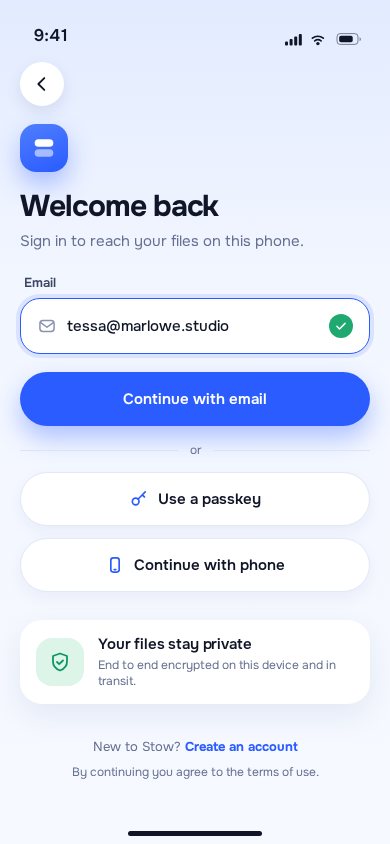
Stow is a complete cloud storage app: onboarding, sign in, a home with suggested files and storage at a glance, files in list and grid, folders, document and photo previews, file details, sharing with people and links, shared with me, starred, offline, search, uploads with a live queue, move to, document scanning, a storage breakdown with clean up, the bin, activity, plans, account and settings. Pale sky and white with cobalt blue and five file type colours.
| Detail | Value |
|---|---|
| Screen type | Sign in |
| App | Stow: Cloud storage |
| Category | Productivity |
| Design language | Minimal, light |
| Type | Onest |
| Colours | #f2f6ff background, #ffffff surface, #101528 text, #667091 text-muted, #2a5cff accent, #ffffff accent-contrast, #8b5cf6 secondary, #e1e8f8 border, #e5484d danger |
What this screen says
- Welcome back
- Sign in to reach your files on this phone.
- tessa@marlowe.studio
- Continue with email
- or
- Use a passkey
- Continue with phone
- Your files stay private
- End to end encrypted on this device and in transit.
- New to Stow? Create an account
- By continuing you agree to the terms of use.
Around it in Stow
More sign in and sign up screens
- Postbox Sign in: Email for busy teams
- Daybook Sign in: Calendar and planner
- Scanly Sign in: Document scanner
- Keyring Sign in: Password manager
- Rota Sign in: Shift scheduling for hourly teams
- Inkwell Sign in: Daily journal
- Shortlist Sign in: Job search and application tracker
- Parley Sign in: Team messenger
- Docket Sign in: Task and sprint planner
- Kanso Sign in: Tasks, calendar and chat
- Margin Sign in: AI note taking
- Aide Create account: Executive AI assistant
Every productivity app sign in screen
What makes a good login screen
- Offer the fastest option first. Sign in with Apple, Google or a passkey takes one tap. If you support them, put them above the email form. Apple asks apps that use a third-party login like Google to also offer an equivalent privacy-focused option, such as Sign in with Apple.
- Separate sign in from sign up clearly. Use different headings and buttons, and a clear link to switch. People who already have an account should never end up creating a second one by accident.
- Use the right keyboard and autofill. Email fields should open the email keyboard and support password managers and one-time code autofill. Small details, big difference in how many people get through.
- Write errors that help. "That password doesn't match this email" is better than "Error 401". Keep what people typed so they only fix the part that was wrong.
The full login screen guide and every example
Remix Stow free: describe your own app and it is drawn in this design. Or get its files from $10: Figma, React Native, SwiftUI, Flutter and HTML.