Templates · Detail screens · Finance app · Standing
Standing Account screen
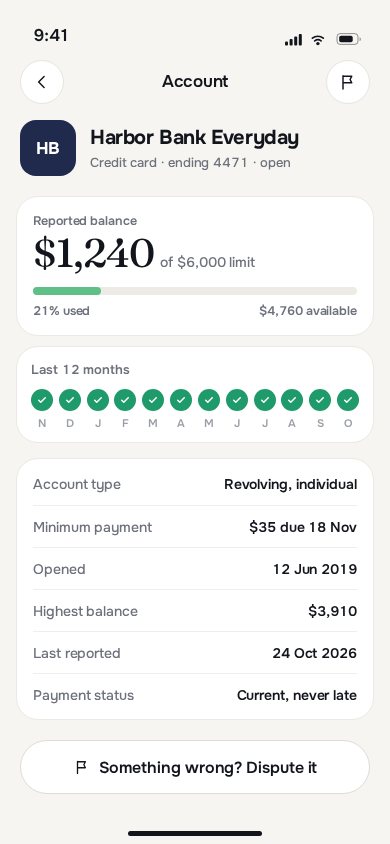
A detail screen from Standing, a credit score and reports app template in a Minimal style. Screen 10 of 25.
Standing is a complete credit score app: welcome, sign up and identity check, a home with the score dial and what changed, score history across two bureaus, the six score factors with card use and payment history in depth, the full report with accounts, an account page and enquiries, a dispute with confirmation, alerts with a was this you check, a score simulator, identity monitoring with a breach, matched card and loan offers clearly marked as offers with an application and a sent screen, a Plus plan, profile and settings. Paper and white with ink and a coral to green score scale.
| Detail | Value |
|---|---|
| Screen type | Detail |
| App | Standing: Credit score and reports |
| Category | Finance |
| Design language | Minimal, light |
| Type | Fraunces for headings, Onest for text |
| Colours | #f6f5f1 background, #ffffff surface, #12151c text, #6d717b text-muted, #12151c accent, #ffffff accent-contrast, #4a4cf0 secondary, #e7e5de border, #d9442e danger |
What this screen says
- Account
- HB
- Harbor Bank Everyday
- Credit card · ending 4471 · open
- Reported balance
- $1,240of $6,000 limit
- 21% used $4,760 available
- Last 12 months
- Account type Revolving, individual
- Minimum payment $35 due 18 Nov
- Opened 12 Jun 2019
- Highest balance $3,910
- Last reported 24 Oct 2026
- Payment status Current, never late
- Something wrong? Dispute it
Around it in Standing
More detail screens
- Roundup Purchase: Invest your spare change
- Envelope Category: Give every dollar a job
- Recur Subscription: Track and cancel subscriptions
- Keel Card: Corporate cards and spend controls
- Giftly Shop: Gift cards, sent and stored
- Zap Wallet: Pay friends with a note
- Billfold Card: Cards, passes and tickets wallet
- Payly Chat: UPI payments, recharges and bills
- Crest Card: Credit card bills and rewards
- Storefront Order: Run your online store
- Bastion Checking: Everyday banking from a big bank
- Later Store: Buy now, pay in four
Every finance app detail screen
What makes a good detail screen
- Lead with what identifies the item. A large image or title, the price or status, and the key facts at the top. People should know they are in the right place at a glance.
- Keep the main action visible. A sticky bottom button for Add to cart, Book or Play stays reachable while people scroll through details.
- Order information by importance. The facts that decide the choice come first; reviews, specifications and fine print further down.
- Use progressive disclosure. Long descriptions, specifications and policies can expand on tap rather than filling the screen.
The full detail screen guide and every example
Remix Standing free: describe your own app and it is drawn in this design. Or get its files from $10: Figma, React Native, SwiftUI, Flutter and HTML.