Templates · Profile screens · Travel app · Spoke
Spoke Profile screen
A profile screen from Spoke, a bike sharing app template in a Minimal style. Screen 23 of 24.
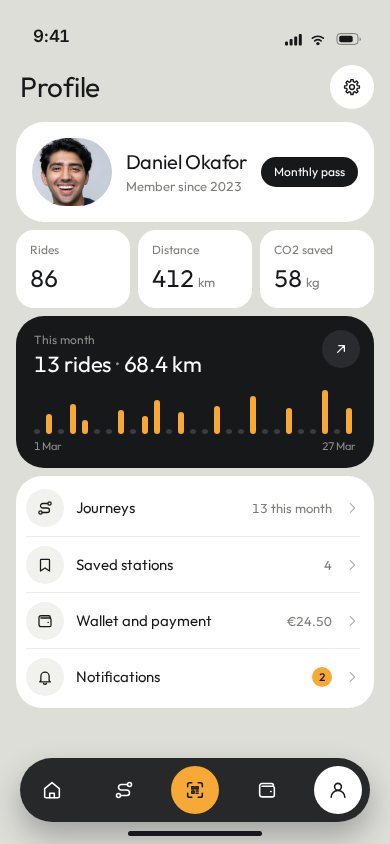
Spoke is a complete bike sharing app: onboarding, sign in, a home map over aerial photography with stations nearby, search, a station, a bike, reserve, scan to unlock, a live ride with directions, parking and a ride summary, journeys and stats, passes with checkout, a wallet, saved stations, profile and settings. Warm grey and black with one amber for bikes, routes and actions.
| Detail | Value |
|---|---|
| Screen type | Profile |
| App | Spoke: Bike sharing |
| Category | Travel |
| Design language | Minimal, light |
| Type | Outfit |
| Colours | #deded9 background, #ffffff surface, #17181a text, #7d7e79 text-muted, #f6a936 accent, #17181a accent-contrast, #1c1d1f secondary, #cfcfc9 border, #e5484d danger |
What this screen says
- Profile
- Daniel Okafor
- Member since 2023
- Monthly pass
- Rides 86
- Distance 412 km
- CO2 saved 58 kg
- This month
- 13 rides · 68.4 km
- 1 Mar 27 Mar
- Journeys
- 13 this month
- Saved stations
- Wallet and payment
- Notifications
Around it in Spoke
More profile screens
- Caravan Profile: Campervan rental and road trips
- Layover Profile: Airport guide, gates and lounges
- Permit Profile: Visas and travel documents wallet
- Backroad Profile: Road trip planner with stops
- Bunk Traveler: Hostels and backpacker meetups
- Piazza Profile: Self-guided city walking tours
- Fjord Profile: Cruise companion on board
- Atlas Profile: Maps and navigation
- Linea Profile: City transit
- Hollow Profile: Cabin and boutique stays
- Aloft Profile: Flight tracker
- Pitch Profile: Campsite booking and trip kit
Every travel app profile screen
What makes a good profile screen
- Lead with identity. Photo, name and one line about the person at the top. It confirms whose profile this is.
- Show meaningful stats. Two to four numbers that matter in this app, like workouts, followers, books read or streak.
- Make editing obvious for the owner. An Edit profile button near the top, shown only on your own profile.
- Organise content with tabs. Posts, activity, saved or achievements as tabs keep a long profile tidy.
The full profile screen guide and every example
Remix Spoke free: describe your own app and it is drawn in this design. Or get its files from $10: Figma, React Native, SwiftUI, Flutter and HTML.