Templates · Detail screens · Food app · Slice
Slice Deal screen
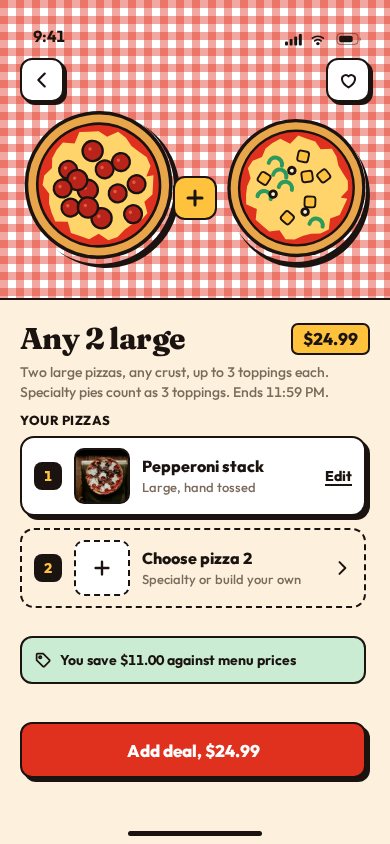
A detail screen from Slice, a food app template in a Neubrutalism style. Screen 13 of 25.
Slice is a complete pizza ordering app: welcome, sign in and a code, a home with the live order and tonight's deals, delivery or carryout with a store finder, the menu, search, a pizza page, a half and half builder with crust, size and sauce, toppings, deals and a deal builder, cart, checkout, payment, an order placed screen, a slice by slice live tracker, the driver on a map, past orders, rewards, a delivery pass, notifications, profile and settings. Crust cream, tomato red, cheese yellow and ink, with red gingham.
| Detail | Value |
|---|---|
| Screen type | Detail |
| App | Slice: Pizza ordering with a live tracker |
| Category | Food |
| Design language | Neubrutalism, light |
| Type | Fraunces for headings, Outfit for text |
| Colours | #fdf0dc background, #ffffff surface, #1b1310 text, #7a6a5c text-muted, #e0301e accent, #ffffff accent-contrast, #ffc23d secondary, #1b1310 border, #2c9a5c success, #e0301e danger |
What this screen says
- Any 2 large
- Two large pizzas, any crust, up to 3 toppings each. Specialty pies count as 3 toppings. Ends 11:59 PM.
- Your pizzas
- Pepperoni stackLarge, hand tossed
- Edit
- Choose pizza 2Specialty or build your own
- You save $11.00 against menu prices
- Add deal, $24.99
Around it in Slice
More detail screens
- Mart Product: Supermarket app with loyalty and scan and go
- Rescue Bag: Surprise bags of surplus food
- Omakase Counter: Chef's counter reservations
- Lunchbox Recipe: School lunch planner for parents
- Agave Recipe: Cocktails and home bar
- Crock Starter: Fermentation and sourdough starter log
- Curbside Truck: Street food and food truck finder
- Forage Produce: Farmers market and veg box
- Ember Probe: Smoker and grill thermometer
- Steep Tea: Tea brewing and tasting notes
- Brigade Ticket: Restaurant kitchen and line ops
- Nibs Result: Food allergy and label scanner
What makes a good detail screen
- Lead with what identifies the item. A large image or title, the price or status, and the key facts at the top. People should know they are in the right place at a glance.
- Keep the main action visible. A sticky bottom button for Add to cart, Book or Play stays reachable while people scroll through details.
- Order information by importance. The facts that decide the choice come first; reviews, specifications and fine print further down.
- Use progressive disclosure. Long descriptions, specifications and policies can expand on tap rather than filling the screen.
The full detail screen guide and every example
Remix Slice free: describe your own app and it is drawn in this design. Or get its files from $10: Figma, React Native, SwiftUI, Flutter and HTML.