Templates · Dashboard and stats screens · Fitness app · Rise
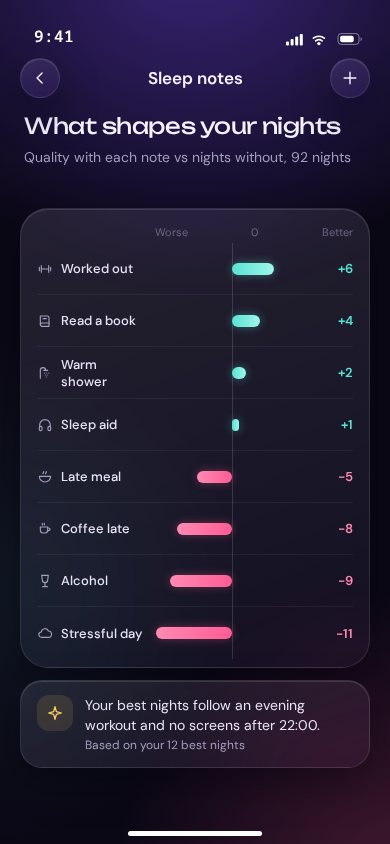
Rise Sleep notes screen
A dashboard screen from Rise, an alarm clock and sleep cycles app template in a Glass style. Screen 18 of 25.
Rise is a complete smart alarm and sleep tracker: welcome, how it works, sign in, a tonight home with the horizon dial, alarms, set alarm with a wake window, wake melodies, bedtime notes, a live tracking night screen, the alarm ringing at sunrise, wake mood, a morning report, the night's sleep graph, snore and sleep talk recordings with a player, a journal, trends, how sleep notes change your nights, snoring, sleep aids with a player, a Plus plan, notifications, profile and settings. Aubergine glass with a rose to gold dawn and aqua.
| Detail | Value |
|---|---|
| Screen type | Dashboard |
| App | Rise: Alarm clock and sleep cycles |
| Category | Health and fitness |
| Design language | Glass, dark |
| Type | Unbounded for headings, DM Sans for text |
| Colours | #0b0816 background, #1b1430 surface, #f6f2ff text, #a59dbd text-muted, #ff4f87 accent, #ffffff accent-contrast, #58e3d4 secondary, #ffd166 highlight, #2a2240 border, #ff6b5e danger |
What this screen says
- Sleep notes
- What shapes your nights
- Quality with each note vs nights without, 92 nights
- Worse 0 Better
- Worked out
- Read a book
- Warm shower
- Sleep aid
- Late meal
- −5
- Coffee late
- −8
- Alcohol
- −9
- Stressful day
- −11
- Your best nights follow an evening workout and no screens after 22:00.
- Based on your 12 best nights
Around it in Rise
More dashboard and stats screens
- Mend Progress: Physio and rehab exercises
- Tabata Stats: HIIT interval timer
- Jab Stats: Boxing workouts with a smart bag
- Exhale Insights: Breathwork sessions
- Bump Trends: Pregnancy week by week
- Locker Busy times: Gym membership and class booking
- Morsel Progress: AI calorie tracker
- Dew Skin report: AI skin scan and routine
- Cradle Growth: Baby tracker
- Medly Vitals: Doctor on call
- Donor Impact: Blood donation, counted drop by drop
- Unfold Streak: Yoga and stretching
Every fitness app dashboard screen
What makes a good dashboard screen
- One headline number. The figure that matters most, like balance, steps or revenue, large at the top with its change since the last period.
- Give numbers context. Compared with last week, against a goal or as a trend line. A number alone does not say if it is good.
- Pick simple charts. Bars for comparing periods, lines for trends and rings for progress toward a goal. Avoid charts that need a legend to read.
- Let people change the period. Day, week, month and year as a segmented control above the chart.
The full dashboard screen guide and every example
Remix Rise free: describe your own app and it is drawn in this design. Or get its files from $10: Figma, React Native, SwiftUI, Flutter and HTML.