Templates · Detail screens · Productivity app · Query
Query Thread screen
A detail screen from Query, an AI answers with sources app template in a Minimal style. Screen 10 of 25.
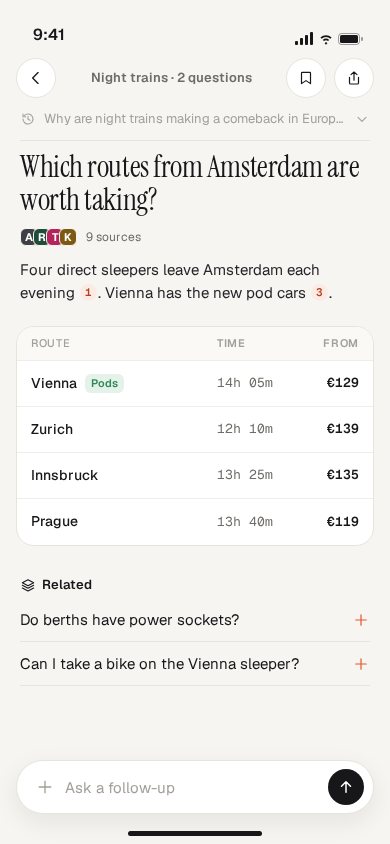
Query is a complete answer engine: welcome, topics, sign in, a home with the ask bar, a search composer, live searching, a cited answer, all sources, a source preview, a follow-up thread, images, deep research and its report, Discover stories, a library, spaces, a market page, voice mode, a Pro plan with checkout and confirmation, notifications, profile and settings. Paper white and ink with one vermilion accent for citations.
| Detail | Value |
|---|---|
| Screen type | Detail |
| App | Query: AI answers with sources |
| Category | Productivity |
| Design language | Minimal, light |
| Type | Instrument Serif for headings, Geist for text |
| Colours | #f6f5f1 background, #ffffff surface, #17171a text, #6e6c66 text-muted, #e4572e accent, #fcebe4 accent-tint, #b53f1b accent-dark, #e7e4dc border, #2f8a57 success |
What this screen says
- Night trains · 2 questions
- Why are night trains making a comeback in Europe?
- Which routes from Amsterdam are worth taking?
- A R T K 9 sources
- Four direct sleepers leave Amsterdam each evening 1 . Vienna has the new pod cars 3 .
- Route Time From
- Vienna Pods 14h 05m €129
- Zurich 12h 10m €139
- Innsbruck 13h 25m €135
- Prague 13h 40m €119
- Related
- Do berths have power sockets?
- Can I take a bike on the Vienna sleeper?
- Ask a follow-up
Around it in Query
More detail screens
- Staffroom Approval: HR, payslips and time off
- Slot Meeting: Booking links and meeting scheduling
- Sheet Record: Spreadsheets and databases
- Tunnel Country: VPN and online privacy
- Ping Test details: Internet speed test
- Glance Product: Visual search with the camera
- Replay Video: Record and share screen videos
- Easel Retro template: Collaborative whiteboard
- Token Account: Two-factor codes and sign-in approvals
- Beam Transfer: Send big files
- Parchment Document: Documents, edit and share
- Lectern Deck: Slides and presenter remote
Every productivity app detail screen
What makes a good detail screen
- Lead with what identifies the item. A large image or title, the price or status, and the key facts at the top. People should know they are in the right place at a glance.
- Keep the main action visible. A sticky bottom button for Add to cart, Book or Play stays reachable while people scroll through details.
- Order information by importance. The facts that decide the choice come first; reviews, specifications and fine print further down.
- Use progressive disclosure. Long descriptions, specifications and policies can expand on tap rather than filling the screen.
The full detail screen guide and every example
Remix Query free: describe your own app and it is drawn in this design. Or get its files from $10: Figma, React Native, SwiftUI, Flutter and HTML.