Templates · Sign in and sign up screens · Smart home app · Porch
Porch Sign in screen
A sign in screen from Porch, a home security cameras app template in a Dark-first style. Screen 2 of 25.
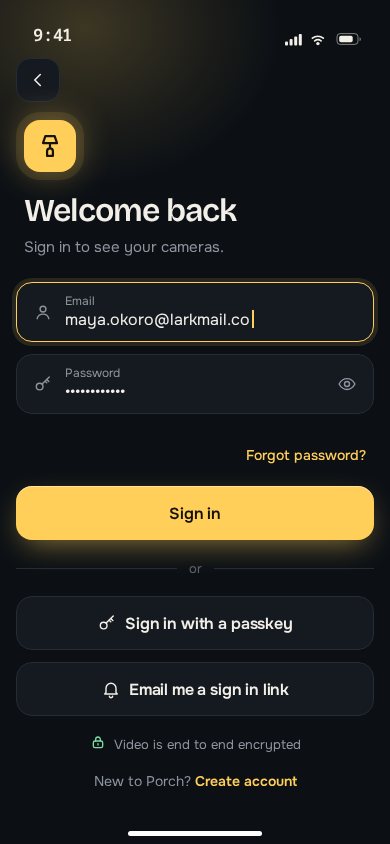
Porch is a complete home security camera app: welcome, sign in, pairing a camera, a home with the arm mode and live feeds, all cameras, a full live view with talk and siren, a doorbell ring, a night alert, the event timeline, a clip player, smart search, familiar faces, deliveries, motion zones, camera settings, modes and an arming countdown, weekly insights, a Plus plan with checkout, notifications, household and settings. Blue black, porch lamp yellow and record red.
| Detail | Value |
|---|---|
| Screen type | Sign in |
| App | Porch: Home security cameras |
| Category | Smart home |
| Design language | Dark-first, dark |
| Type | Bricolage Grotesque for headings, Onest for text |
| Colours | #0c1015 background, #151a21 surface, #f2efe8 text, #8d949e text-muted, #ffcf5a accent, #16120a accent-contrast, #7fdca0 secondary, #252c35 border, #ff5d4f danger |
What this screen says
- Welcome back
- Sign in to see your cameras.
- maya.okoro@larkmail.co
- Password
- ••••••••••••
- Forgot password?
- Sign in
- or
- Sign in with a passkey
- Email me a sign in link
- Video is end to end encrypted
- New to Porch? Create account
Around it in Porch
More sign in and sign up screens
- Lumen Sign in: Smart home energy
- Abode Sign in: Smart home devices
- Boxed Sign in: Book movers and plan moving day
- Meter Sign in: Your energy supplier account
- Couch Sign in: TV remote, casting and watchlist
- Chime Sign in: Voice assistant and smart speaker
- Latch Sign in: Smart locks and guest access
- Mesh Sign in: Home Wi-Fi network
- Decibel Sign in: Multi-room speakers
- Nursery Sign in: Baby monitor camera and sleep
- Sundial Sign in: Solar panels and home battery
- Puddle Sign in: Garden watering and sprinklers
Every smart home app sign in screen
What makes a good login screen
- Offer the fastest option first. Sign in with Apple, Google or a passkey takes one tap. If you support them, put them above the email form. Apple asks apps that use a third-party login like Google to also offer an equivalent privacy-focused option, such as Sign in with Apple.
- Separate sign in from sign up clearly. Use different headings and buttons, and a clear link to switch. People who already have an account should never end up creating a second one by accident.
- Use the right keyboard and autofill. Email fields should open the email keyboard and support password managers and one-time code autofill. Small details, big difference in how many people get through.
- Write errors that help. "That password doesn't match this email" is better than "Error 401". Keep what people typed so they only fix the part that was wrong.
The full login screen guide and every example
Remix Porch free: describe your own app and it is drawn in this design. Or get its files from $10: Figma, React Native, SwiftUI, Flutter and HTML.