Templates · List and feed screens · Finance app · Piggy
Piggy Learn screen
A list screen from Piggy, a pocket money for kids app template in a Playful style. Screen 15 of 25.
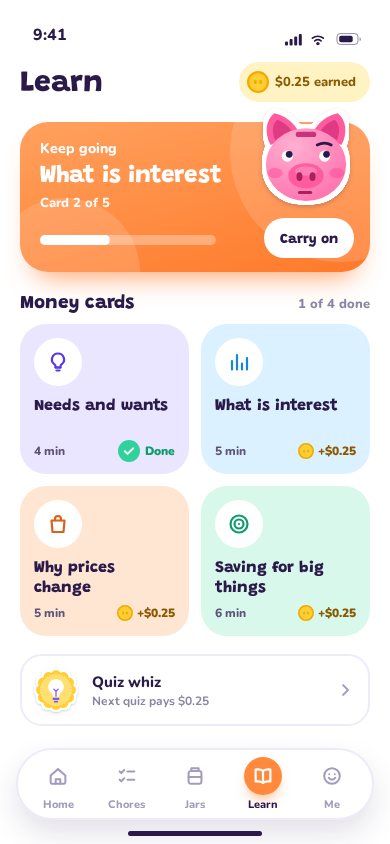
Piggy is a complete pocket money app for a child and their grown ups: welcome, parent sign in and a kid PIN, a home with spend, save and give money, chores with rewards and a done moment, weekly allowance with a split, save jars with goals, adding money and starting a jar, asking to spend, learn cards with a quiz, a sticker book of badges, an activity dashboard, a parent view with approvals, a family plan, notifications, profile and settings. Candy pink, lemon, mint, sky and grape on white, with a drawn pig mascot and sticker badges.
| Detail | Value |
|---|---|
| Screen type | List |
| App | Piggy: Pocket money for kids |
| Category | Finance |
| Design language | Playful, light |
| Type | Grandstander for headings, Nunito for text |
| Colours | #ffffff background, #f7f4fc surface, #2a1a4a text, #8b84a3 text-muted, #ff5c9f accent, #ffffff accent-contrast, #ffcf33 secondary, #efeaf8 border, #ff4d5e danger |
What this screen says
- Learn
- $0.25 earned
- Keep going
- What is interest
- Card 2 of 5
- Carry on
- Money cards1 of 4 done
- Needs and wants
- 4 min Done
- 5 min +$0.25
- Why prices change
- Saving for big things
- 6 min +$0.25
- Quiz whiz
- Next quiz pays $0.25
- Home
- Chores
- Jars
- Me
Around it in Piggy
More list and feed screens
- Levy Income: Taxes for freelancers
- Bullion Holdings: Gold and silver savings
- Wage Shifts: Get paid as you work
- Keystone Schedule: Mortgage and home loan tracker
- Rebate Activity: Cashback card and rewards
- Aegis Policies: Insurance policies and claims
- Till Sales: Card reader and sales for small shops
- Strike Option chain: Options trading
- Prism Accounts: Net worth across every account
- Folio Watchlist: Stocks and ETF investing
- Compound Fund list: Mutual funds and SIPs
- Halden Transactions: Premium neobank
What makes a good list screen
- Show what people need to decide. Each row should carry just enough to choose: a title, one or two details and a status. Everything else belongs on the detail screen.
- Keep rows consistent. The same information in the same place on every row lets people scan down a column instead of reading each item.
- Group with headings. Dates, categories or status headings break long lists into chunks people can skip through.
- Make common actions quick. Swipe actions, a checkbox or a heart on the row save opening the item for small tasks.
The full list screen guide and every example
Remix Piggy free: describe your own app and it is drawn in this design. Or get its files from $10: Figma, React Native, SwiftUI, Flutter and HTML.