Templates · Dashboard and stats screens · Finance app · Piggy
Piggy Activity screen
A dashboard screen from Piggy, a pocket money for kids app template in a Playful style. Screen 19 of 25.
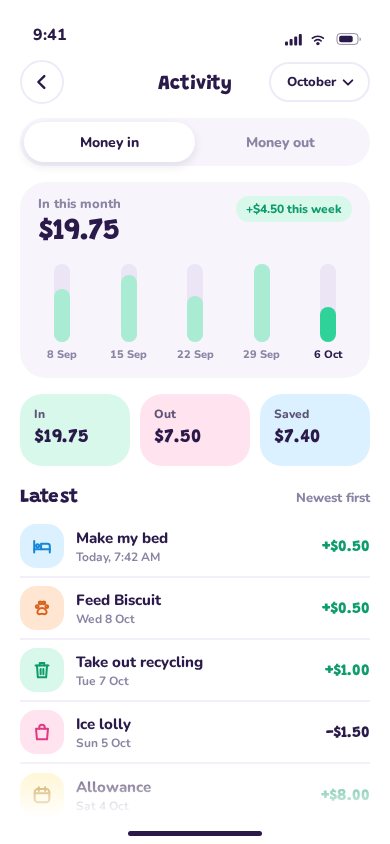
Piggy is a complete pocket money app for a child and their grown ups: welcome, parent sign in and a kid PIN, a home with spend, save and give money, chores with rewards and a done moment, weekly allowance with a split, save jars with goals, adding money and starting a jar, asking to spend, learn cards with a quiz, a sticker book of badges, an activity dashboard, a parent view with approvals, a family plan, notifications, profile and settings. Candy pink, lemon, mint, sky and grape on white, with a drawn pig mascot and sticker badges.
| Detail | Value |
|---|---|
| Screen type | Dashboard |
| App | Piggy: Pocket money for kids |
| Category | Finance |
| Design language | Playful, light |
| Type | Grandstander for headings, Nunito for text |
| Colours | #ffffff background, #f7f4fc surface, #2a1a4a text, #8b84a3 text-muted, #ff5c9f accent, #ffffff accent-contrast, #ffcf33 secondary, #efeaf8 border, #ff4d5e danger |
What this screen says
- Activity
- October
- Money in Money out
- In this month$19.75
- +$4.50 this week
- 8 Sep
- 15 Sep
- 22 Sep
- 29 Sep
- 6 Oct
- In$19.75
- Out$7.50
- Saved$7.40
- LatestNewest first
- Make my bed
- Today, 7:42 AM
- Feed Biscuit
- Wed 8 Oct
- Take out recycling
- Tue 7 Oct
- Ice lolly
- Sun 5 Oct
- Allowance
- Sat 4 Oct
Around it in Piggy
More dashboard and stats screens
- Zap Insights: Pay friends with a note
- Billfold Spending: Cards, passes and tickets wallet
- Payly Spends: UPI payments, recharges and bills
- Crest Spends: Credit card bills and rewards
- Storefront Analytics: Run your online store
- Bastion Spending: Everyday banking from a big bank
- Later Spending limit: Buy now, pay in four
- Standing Score history: Credit score and reports
- Accrue Projection: Retirement and pension planner
- Levy Deductions: Taxes for freelancers
- Bullion Markets: Gold and silver savings
- Wage Earnings: Get paid as you work
Every finance app dashboard screen
What makes a good dashboard screen
- One headline number. The figure that matters most, like balance, steps or revenue, large at the top with its change since the last period.
- Give numbers context. Compared with last week, against a goal or as a trend line. A number alone does not say if it is good.
- Pick simple charts. Bars for comparing periods, lines for trends and rings for progress toward a goal. Avoid charts that need a legend to read.
- Let people change the period. Day, week, month and year as a segmented control above the chart.
The full dashboard screen guide and every example
Remix Piggy free: describe your own app and it is drawn in this design. Or get its files from $10: Figma, React Native, SwiftUI, Flutter and HTML.