Templates · Paywall screens · Travel app · Permit
Permit Plus screen
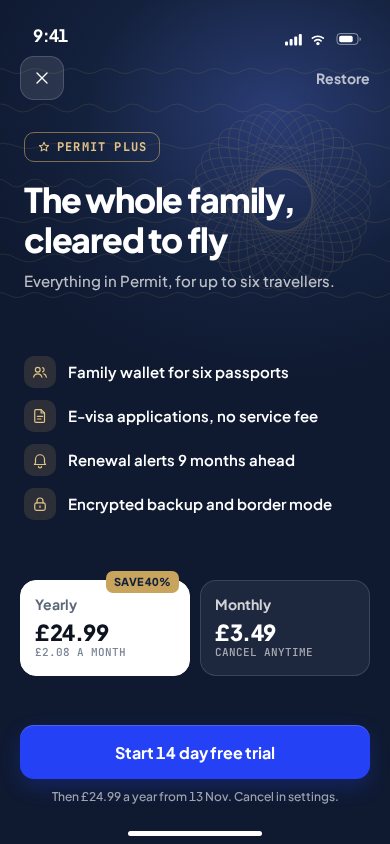
A paywall screen from Permit, a visas and travel documents wallet app template in a Clinical style. Screen 23 of 25.
Permit is a complete travel documents wallet: welcome, sign in, a passport scan, a wallet of passports, visas and cards, the passport data page, every document, a trip with entry readiness per country, an entry requirements check and the rules for one country, a travel authorisation, an e-visa application with a compliant photo, review and pay and a submitted screen, live application status, a 90 in 180 day stay counter, a validity timeline, add a document, a secure share link, border mode, family passports, alerts, a Plus plan, profile and settings. Paper grey and white with cobalt, navy and quiet status colours.
| Detail | Value |
|---|---|
| Screen type | Paywall |
| App | Permit: Visas and travel documents wallet |
| Category | Travel |
| Design language | Clinical, light |
| Type | JetBrains Mono for headings, Plus Jakarta Sans for text |
| Colours | #eef1f5 background, #ffffff surface, #0d1420 text, #5d6778 text-muted, #2541f5 accent, #ffffff accent-contrast, #14213d secondary, #e1e6ee border, #c42a30 danger, #0b7a55 success, #9a5a00 warning |
What this screen says
- Restore
- PERMIT PLUS
- The whole family, cleared to fly
- Everything in Permit, for up to six travellers.
- Family wallet for six passports
- E-visa applications, no service fee
- Renewal alerts 9 months ahead
- Encrypted backup and border mode
- SAVE 40%
- Yearly
- £24.99£2.08 A MONTH
- Monthly
- £3.49CANCEL ANYTIME
- Start 14 day free trial
- Then £24.99 a year from 13 Nov. Cancel in settings.
Around it in Permit
More paywall screens
- Detour Plus: Community driving navigation
- Convoy Plus: Carpooling between cities
- Manifest Pro: Trip plans from your confirmation emails
- Roadster Plus: Your electric car, from your phone
- Fairground Plus: Theme park tickets, wait times and map
- Scoot Passes: E-scooter and e-bike rental
- Nomad Pass: Travel eSIM data plans
- Tern Pass: Ferry and island hopping
- Berth Circle: Night trains and sleeper cabins
- Caravan Club: Campervan rental and road trips
- Layover Pass: Airport guide, gates and lounges
- Backroad Plus: Road trip planner with stops
Every travel app paywall screen
What makes a good paywall screen
- Lead with the outcome, not the feature list. The headline should say what changes for the person: "Train smarter every week" beats "Unlock Premium". Three to five benefits underneath are enough; more turns into a wall of ticks nobody reads.
- Show the real price, period and trial terms. State the price, how often it renews and when a free trial turns into a charge, near the button. Apple's App Store guideline 3.1.2 asks subscription apps to make this clear before purchase, and Google Play has similar rules.
- One primary button. The main call to action should be impossible to miss and say what happens: "Start 7-day free trial" or "Subscribe for $4.99/month". A second plan choice is fine; a second competing button is not.
- Make the plans easy to compare. When you offer monthly and yearly, show both prices in the same unit (per month or per week) and mark the saving on the yearly plan in plain numbers, not just a badge.
The full paywall screen guide and every example
Remix Permit free: describe your own app and it is drawn in this design. Or get its files from $10: Figma, React Native, SwiftUI, Flutter and HTML.